


Martin does not have any add-ons for sale.
-
Support December 23rd, 2025 @ 12:19 pm
I figured it out more about this for the edit view for a dyanamic panels configuration record.
So We've using different layouts (edit/detail) for different security groups, this plugin assumes the user would only ever have 1 sets of layouts for any security group (the default one) so for example lets say there are 2 sets of edit and detail view layouts for the Opportunities module. 1 set for 1 security group, and the other set for the other security group, and then there is the default set (edit/detail layouts) for users who are not members of security groups which have a specific layout for the given module.
If you add the grpLayout parameter to your VIDynamicPanelsAllModuleFields entrypoint and set it to the security group ID which has a specific layout for a module it will return the fields which are present in that layout and not the default one. if you provide either an invalid ID or an id of a security group which does not have a specific layout for the module then an empty response is returned. example /index.php?entryPoint=VIDynamicPanelsAllModuleFields&flow_module=Opportunities&grpLayout=some_security_group_id
This works because the grpLayout request parameter is checked within the layout parser and nothing extra needs to be added to the VIDynamicPanels php files
This explains why the fields we are using are not showing up in the configuration (as they are specific to this security group layout) and why we are having to tweak the plugin files like mentioned before.
A proposal to support security groups with their own layouts: You could either add something to your plugins editview to check if a module has a specific view for a security group ahead of time, or you could fire 2 requests to the VIDynamicPanelsAllModuleFields entrypoint 1 which includes the grpLayout, if it returns an empty response then you can get the default layout by omitting the parameter.
This only fixes it on the configuration screen, I imagine there would be some tweaking to be done for the js code which runs on the view. I still stand by not tying users to specific field types though,
if someone wants to use a custom type I don't think they currently could.
View Comment
-
Support December 15th, 2025 @ 1:41 pm
it is 100% because you are using getValidFieldsTypes from AOW this function does not support radio buttons / checkboxes dropdown lists or dynamic dropdown lists you should make your own function
View Comment
-
Support December 15th, 2025 @ 1:37 pm
I think I've tracked this down. this is due to
modules/AOW_WorkFlow/aow_utils.phpgetValidFieldsTypesthis function does not handle many field types and may not be a good option to rely on. there may be better implementations in later versions of Suite
but essentially I would not rely on
View CommentgetValidFieldsTypesfrommodules/AOW_WorkFlow/aow_utils.php
-
Support December 15th, 2025 @ 1:31 pm
I would look over
View Commentcustom/VIDynamicPanels/VIDynamicPanelsFunctions.phpandcustom/VIDynamicPanels/VIDynamicPanelsModuleFields.php
-
Support December 15th, 2025 @ 1:13 pm
custom/VIDynamicPanels/VIDynamicPanelsDetailViewCheckCondition.phparound line 500there is a foreach loop going through all the fields for a record type, it then checks the
$defaultFieldsvariable against all the fields before adding to to the$defaultFieldsHideArrayvariable. all this seems to be some kind of sanity check to make sure only fields that exist in variable definitions are considered for the plugin.because the plugin is unable to properly find all fields for a record type this makes sense why it does not work. after removing the sanity check because VI dynamic panels to fails to find all fields, the hide and show functionality works an unlimited amount of times instead of only for the first time.
Would you like me to go through the code which finds the fields for a record type and hopefully I can help you fix this problem?
View Comment
-
Support December 15th, 2025 @ 12:56 pm
so on the second time
/index.php?entryPoint=VIDynamicPanelsCheckConditionis called where the conditions are not met (success is set to false)
View Commentdata['defaultFieldsHideArray'];is empty when it should contain the names of fields to hide by default I am guessing there is an issue with theVIDynamicPanelsCheckConditionentrypoint
-
Support December 15th, 2025 @ 11:33 am
The first message I've stated I am using version 16.0 which is the latest version listed on this site.
continuing from my issue hide/show only works once. after a field has been hidden once and then reappears, it will not hide again when the conditions are met a second time.
I will test all the above in a brand new CRM system, I will do this when I have a spare moment.
View Comment
-
Support December 15th, 2025 @ 10:47 am
actually I think these are placed in the
View Commentfield_showcolumn of thevi_dynamic_panelstable
-
Support December 15th, 2025 @ 10:43 am
to make a field appear after a condition is met, do I need to create a
View Commentvi_dynamic_panels_subpanel_module_fieldsrecord or avi_dynamic_panels_fieldsrecord?
-
Support September 24th, 2024 @ 12:25 pm
corrected code is as follows: $module_title = join((new SugarView())->getBreadCrumbSymbol(),$new_params);
View Comment
-
Support July 8th, 2024 @ 3:18 pm
I have added the following method to both
custom/VIDynamicPanels/VIDynamicPanelsAllModuleFields.phpand
custom/VIDynamicPanels/VIDynamicPanelsAllModulePanels.phpfunction getViewPanels($view, $module) { require_once 'ModuleInstall/PackageManager/PackageManager.php'; $lView = strtolower($view); $secsuiteproInstalled = false; $pm = new PackageManager(); $installedModulesInfo = $pm->getinstalledPackages(); foreach ($installedModulesInfo as $installedModuleInfo) { if ($installedModuleInfo['name'] === "SecuritySuite - Enhanced, Professional, and Enterprise") { $secsuiteproInstalled = true; break; } } if ($secsuiteproInstalled) { $moduleDirectory = BeanFactory::newBean($module)->module_dir; // $moduleDirectory = (new $module())->module_dir; include "custom/modules/$moduleDirectory/metadata/$securityGroupID/{$lView}defs.php"; $editViewPanelArray = $viewdefs[$module][$view]["panels"]; $panelArray = $editViewPanelArray; return $panelArray; } else { $view_array = ParserFactory::getParser($lView, $module); $panelArray = $view_array->_viewdefs['panels']; return $panelArray; } }This function replaces the parts of the code which gets the panels metadata. it will check if the full version of security suite is installed. if it is then it will use an alternate method to get the view metadata, otherwise it will use the standard method.
I may need to tweak this slightly after battle testing. not sure if I need to do extra handling for default layouts.
View Comment
-
-
-
Support July 8th, 2024 @ 10:12 am
my proposal is to expand the first parameter $view,
this can be both the group id and the view name a colon, pipe, or similar symbol can be used as a delmeter,
and could be called like so:
View Comment$view = "2d1f3312-6ca8-1fe6-dc2d-2a645d3d2c23|editview"; $module = "Contacts"; $metadata = ParserFactory::getParser($view, $module);
-
Support July 8th, 2024 @ 10:03 am
So far I have made modifications to the JavaScript to send the id of the selected Security Group during the calls to the backend. if no security group is selected it will send null for this parameter.
The PHP code will then be able to use this id to select the correct layout for the view and return the panels and fields within it. first the following needs to be addressed.
the function
function getEditDetailViewFields($view,$module)makes use of the ParserFactory. SecuritySuite does not override the ParserFactory to make it possible to select the correct layout for a view.
I have reached out to SecurtiySuite to see if they have plans to override the ParserFactory. For the moment until this is addressed, I'll use the ParserFactory if no security group id is returned or if the CRM system is not using the full version of Security Suite otherwise, I will use another method for obtaining a views metadata,
View Comment
-
Support July 4th, 2024 @ 1:27 pm
I am already aware that you are not responsible for any changes I make that break the plugin these changes are for your benefit if you wish to include them with your plugin
View Comment
-
Support July 4th, 2024 @ 1:25 pm
Hi,
Within the CRM it is possible to create different layouts for different security groups containing different fields. Currently when using dynamic panels no matter which security group is selected, the UI will always return the fields and panels that are defined in the default layout.
We would like the list of fields and panels from the layout that would be active with the selected security group.
View Comment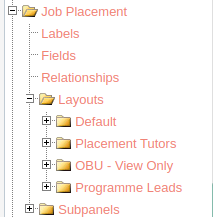
-
Support July 4th, 2024 @ 9:26 am
I would also like to know the correct official way to do this. uninstalling the plugin deletes the relevant tables even when "do not remove tables" is selected.
the only way I've been able to do it successfully is to backup the data in the tables first. and then insert the records after installing the new version
View Comment
-
Support November 8th, 2023 @ 2:09 pm
I've viewed modules/Relationship/Relationship.php from the SuiteCRM 7.14.0 zip and Relationship::get_other_module is not supposed to be a static method.
View Comment
-
Documentation September 4th, 2023 @ 9:55 am
I'd reccomdend when updating the CRM system, 1. check to make sure a version of security suite exists for the version of SuiteCRM you are updating to. 2. uninstall SecuritySuite (make sure not to delete tables), 3. install the SuiteCRM update 4. delete the previous SecuritySuite module 5. upload and install the new SecuritySuite module
6 (optional). if using the bitnami docker images. try to run a couple of Suitecrm versions older than your actual SuiteCRM version. Security Suite as well as SuiteCRM does not work with the PHP handler versions set on the latest versions of these images.
View Comment
-
June 8th, 2017 @ 8:25 pm

We have used this plugin for 2 years and it has improved our processes so much! Admin cut in half! We send a webform to clients to sign up Straight into CRM then generate and print their paperwork to sign Works great on mobile devices, generate on IOS and you can open the doc in other apps like Word or Drive / Dropbox View Add-on
-
June 17th, 2017 @ 2:25 pm
Great add on for a small one off cost allowing admin users to give rights to edit dropdowns from the edit screen! View Add-on
-
June 17th, 2017 @ 2:26 pm
Works great with custom modules and the support is I receive from the guys is the best! View Add-on
-
September 8th, 2017 @ 2:25 pm
This plugin is great! Works with all relevant modules! Send and manage signatures really easily inside SuiteCRM Even better, the developers are great at customising the plugin for your specific needs For example We send a document from the Account level for Contacts to be assigned Urdva Tech customised the plugin to allow us to click send from company, select what Contact was the primary contact and other contacts that need to sign This is then reflected for the information generated onto the PDF about the Contact Also this dictates what the Contact is allowed to sign We can now send 1 document from an Account, dictate & manage 3 Contact signatures all from SuiteCRM! 10/10 View Add-on
-
July 3rd, 2020 @ 11:11 am
We have now installed this plugin for 2 clients - both giving 5/5 Works perfectly! Syncs our Events and attendees, creating new Contacts and EngageCRMUK set up audit reports for users to cleanse new Contacts that have registered for an event With our Companies and Contacts in SuiteCRM we can now report on engagement and attendance via EventBrite This is giving us a great insight into what Companies are engaging and we are targeting them more effectively with bespoke training / events EngageCRM UK can always rely on UrdvaTech to be there to support us on their plugins and development (any SuiteCRM help!) They are great and happy to help! Thanks again View Add-on
-
May 25th, 2023 @ 12:32 pm

Some of the documentation is out of date due since exchange admin center and outlook's user interfaces have changed considerably. It has taken considerable effort to get the plugin in an almost working state. View Add-on
-
December 15th, 2025 @ 1:51 pm

Really good module I like how it has been implemented however contains some bugs. after reading through the code and seeing what it does. it unfortunately relies on a function from Advanced Open Workflow to find fields for a record type. Because of this the plugin does not work with radio buttons, checkboxes, dropdown lists, or dynamic dropdown lists (fields of these types are not selectable within the UI). There may be other field types that this plugin is unable to detect. I have reached out to the developer and instructed them how to solve these issues. I may also create a forum post detailing how to fix this plugin manually if this does not go any further. View Add-on
-
 7.9.0
7.9.0
-
- 7.9.1
-
- 7.9.1
Martin has not created any Wanted Add-ons.