


-
Display Namecrmspace GmbH
-
Website
-
Member SinceMay 24th, 2023
-
Last SeenSeptember 23rd, 2026
crmspace GmbH does not have any add-ons for sale.
-
Support June 30th, 2026 @ 8:32 am
Hello Helfertech, Thank you for the update, the new version seems to have solved the issue with the labels!
Regarding my question about favorites: embedding it directly as a button is a good idea and works fine in itself. Unfortunately, there is the following issue:
- If I as a user only have view permissions for certain Kanban records, the button to open it is still shown even when no read permission exists. Adding this check would be a great addition for a later version.
- Regarding the "Favorite". In Suite there is normally an option in the detail view to mark records as favorites at the user level. These then appear permanently in the left side menu:
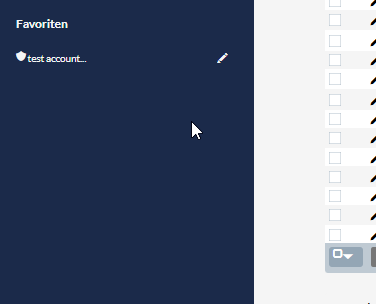
These are essentially CRM internal bookmarks that work across modules. But if I'm interpreting your answer correctly, the button is currently the only similar option?
Thank you and best regards!
View Comment
-
Support June 26th, 2026 @ 8:38 am
And a second question came to mind: Is it possible to mark a Kanban Board as a favorite record, so that it appears in the sidebar menu?
View Comment
-
Support June 26th, 2026 @ 8:35 am
Hi there, sorry for my mistake, please close this request, I posted here by accident!
Best, crms
View Comment
-
Documentation June 25th, 2026 @ 12:12 pm
Hi, same question about Suite v8: do you have any information about the compatibility with latest suite-versions?
View Comment
-
Support April 30th, 2026 @ 12:57 pm
To confirm, are you saying that unsubscribes aren't being synced back to Sugar as expected?
Exactly. In Suite, a campaign-ready mail address is shown with two green checkmarks. The first checkmark would be set automatically, but the second checkbox (indicating the contacts approval by clicking the DOI-Link), should be set by the DOI process via mailchimp. Secondly, a user who is withdrawing his consent should be updated in the CRM accordingly too (different checkboxes in the mail-address record).
Anyway, I asked for a meeting next week, hoping that we can discuss these questions together.
Thanks, Felix
View Comment
-
Support March 26th, 2026 @ 1:55 pm
Hi Heidi, thank you very much for your detailed responses to our points. We are currently waiting for the DMZ server and will get back to you as soon as we have test results.
Best regards
View Comment
-
Support March 24th, 2026 @ 11:10 am
Hi, still, I personally do not understand which parameters are involved and what needs to configured for what purpose.
In Step 1: Within the linked script, $sugar_url contains the local address of the CRM, so in our case the current and local IP like for example "http://10.10.0.1/index.php"? The script itself should be hosted on a server that is available from mailchimp servers and can connect to the CRM (classic DMZ)?
In Step 2: There is a link that should explain something about webhook configurations in mailchimp, but the link doesnt work ("Add this script as a new webhook for each list that syncs to your CRM"). Assumption: Somewhere in Mailchimp we need to set a link per list that points to the php file storing the above script, and add the suffix "?module=SugarChimp&entryPoint=SugarChimpWebhook" to that URL?
In Step 3: "Even if your instance is publicly available via reverse proxy": By "reverse proxy", you refer to that same php-script-file?
Secondly, the query contains "https://your-CRM-endpoint", what url is that? The full URL like https://our.dmz.server.tld/script.php?module=SugarChimp&entryPoint=SugarChimpWebhook or just https://our.dmz.server.tld/script.php ?
View Comment
-
Support March 23rd, 2026 @ 12:50 pm
Hi Heidi, as said, we were able to install the addon in the end, it simply required to allow the copy() command from the config. But to avoid this problem with other customers, the installation process should be refactored and tested with a recent suite version.
View Comment
-
Support March 13th, 2026 @ 4:04 pm
Found a possible solution by adding an exception for the copy method to the config. But the installation file seems to be incompatible with 7.14.7/default config.
View Comment
-
Support May 5th, 2025 @ 6:45 am
I'll try to explain it differently: our contacts have a relationship to a new module, let's call it ContactPreferredCommunicationChannel. The relationship is 1:m (a contact has 0 to many linked objects of this type). This module contains the relevant information for building our target lists. Due to the cardinality of the relationship (and other factors), our report must therefore start with the ContactPreferredCommunicationChannel module. Only then do we access the contacts via a join. As mentioned, our target contact list also has a relationship to ContactPreferredCommunicationChannel.
Now we're at the starting point: adding ContactPreferredCommunicationChannel records to the target contact list works with this add-on. However, removing records that are no longer qualified does not work. Hence the question from the first post.
Number of records: not a factor here. All tests were done with less than 10 records.
View Comment
-
Support November 20th, 2024 @ 12:38 pm
an update: we've created another virtual host on the very same webserver, crm and portal both use subdomain with an individual prefix (e.g. portal.xyz.com and crm.xyz.com). the CORS issue is still the same, and both virtualhosts use ssl. but, secondly, if i turn on my chrome extension to overcome the cors-issues, the 500 internal server error remains when trying to load a page. we have created a dedicated php-error-log file for the crm virtualhost, and i cannot see any explanation besides the usual suite-warnings. in summary: exchanging the webserver wasnt helpful.
and, last but not least, i also noticed that the portal designer page in suitecrm itself is also not fully working. i created page schemas for accounts, but if some other modules are selected, another error becomes visible:
View Commentsugar_grp1_jquery.js…GqXToTTo2eBa3haDA:2 POST https://crm.ourdomain.tld/index.php?module=ant_CustomerPortal&action=getLayoutEditor 500 (Internal Server Error) send @ sugar_grp1_jquery.js…GqXToTTo2eBa3haDA:2 ajax @ sugar_grp1_jquery.js…GqXToTTo2eBa3haDA:2 (anonymous) @ sugar_grp1_jquery.js…GqXToTTo2eBa3haDA:6 e. @ sugar_grp1_jquery.js…GqXToTTo2eBa3haDA:6 prepareLayoutDesigner @ index.php?module=ant…ction=settings:1720 onchange @ index.php?module=ant…ction=settings:1184 handleMouseUp_ @ unknown
-
Support November 19th, 2024 @ 3:01 pm
Hi, I can try to utilize another server, just need do some preps first. but to answer your questions: - Suite 7.14.5 - PHP 8.2.24
View Comment
-
Support June 21st, 2024 @ 6:48 am
usually it is, yes. but as mentioned, using the en_en language pack was allowing us to select those two modules, but the icons still didn't appear in both languages.
View Comment
-
Support June 18th, 2024 @ 7:13 am
Hi,
in our regular language pack, the connector config did not display any modules, in the english version contacts and accounts were shown. So we activated the addon for both modules and logged out again.
that was related to step 8. In our language pack, the page didnt show any elements to select from. After logging in english, contacts and accounts were selectable, thats what we did. But in both languages, no menu icon was shown.
View Comment
-
Support May 31st, 2024 @ 10:12 am
Hello, Is there any news on this case? Thank you very much for your help in advance!
View Comment
-
Support May 16th, 2024 @ 12:42 pm
Hello and sorry for the late answer - the used SuiteCRM version is 7.12.3
View Comment
crmspace GmbH has not rated any add-ons.
crmspace GmbH has not verified any add-ons.
crmspace GmbH has not created any Wanted Add-ons.