


Every day, businesses lose leads, miss customer requests, and waste hours sorting through overflowing inboxes.
By the time someone identifies what’s sales and what’s support, it’s already too late — SLAs are breached, follow-ups are forgotten, and opportunities are lost.
Don't Worry! FynTriaging helps to avoid manual repetitive work of sorting and assigning emails to dedicated departments & teams and automates the process in seamless manner with the help of GenAI, so your team can focus on real work i.e., problem solving and lead engagement.
User Guide
FynTriaging Email Sense User Guide
Introduction
Welcome to the FynRahbar Email Sense User Guide.
This document explains how FynRahbar Email Sense automatically analyzes incoming emails and converts them into actionable CRM records inside SuiteCRM—without any manual effort.
Using Generative AI, the solution understands the intent of each email and creates the appropriate record:
- Leads for sales enquiries
- Cases for customer support requests
This guide demonstrates two real-world use cases to show how Email Sense saves time, improves response speed, and ensures no opportunity or issue is missed.
Use Case 1: Automatic Lead Creation from Sales Enquiry Emails
Step 1: Compose an Enquiry Email
In this example, an enquiry email is sent to the email address configured for AI-based email triaging. This mailbox is monitored continuously by FynRahbar Email Sense.
Email in below screenshot is written in a** generic enquiry tone**, simulating interest in products or services.
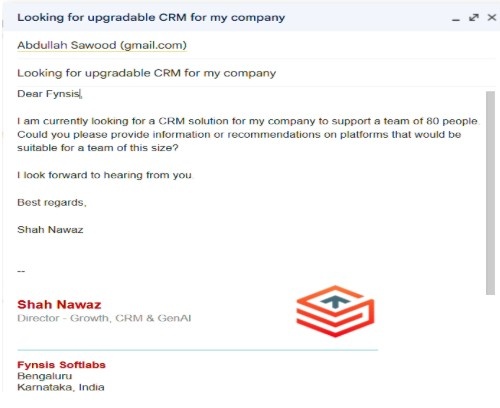
Step 2: AI Processes the Email (Background Step no manual action)
Once the email is sent :
- Wait for 2 mins for SuiteCRM to syncs with the email server
- FynRahbar Email Sense analyzes the email content and AI identifies the email as a sales enquiry and create a Lead record automatically with all relevant details
⏱️ This process typically takes 1–2 minutes and requires no manual action from the user.
Step 3: View the Newly Created Lead in Leads Module List View
- Navigate to the Leads module in SuiteCRM.
- You will find a new lead already created based on the enquiry email.
The Leads list view shows the automatically created lead, ready for follow-up
Step 4: Review the Lead Details
Open the newly created lead record, you will see how Generative AI has accurately extracted and populated key information from the email body, including:
- Name & Company Name
- Email address
- Phone and mobile numbers
- Designation and department
- Description and enquiry context
This eliminates manual copy-paste work and enables your sales team to engage immediately with complete and accurate information.
Lead Detail View Screenshot
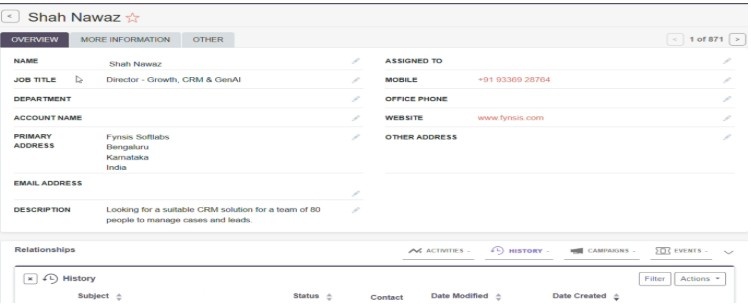
All relevant information is intelligently captured from the email body and stored in structured CRM fields. This eliminates copy-paste work and enables the sales team to engage immediately with full context
Use Case 2: Case Creation from Support Request Email
Step 1: Compose a Support Request Email
In this example, an enquiry email is sent to the email address configured for AI-based email triaging. This mailbox is monitored continuously by FynRahbar Email Sense.
Below is customer support-related email describing an issue that needs assistance
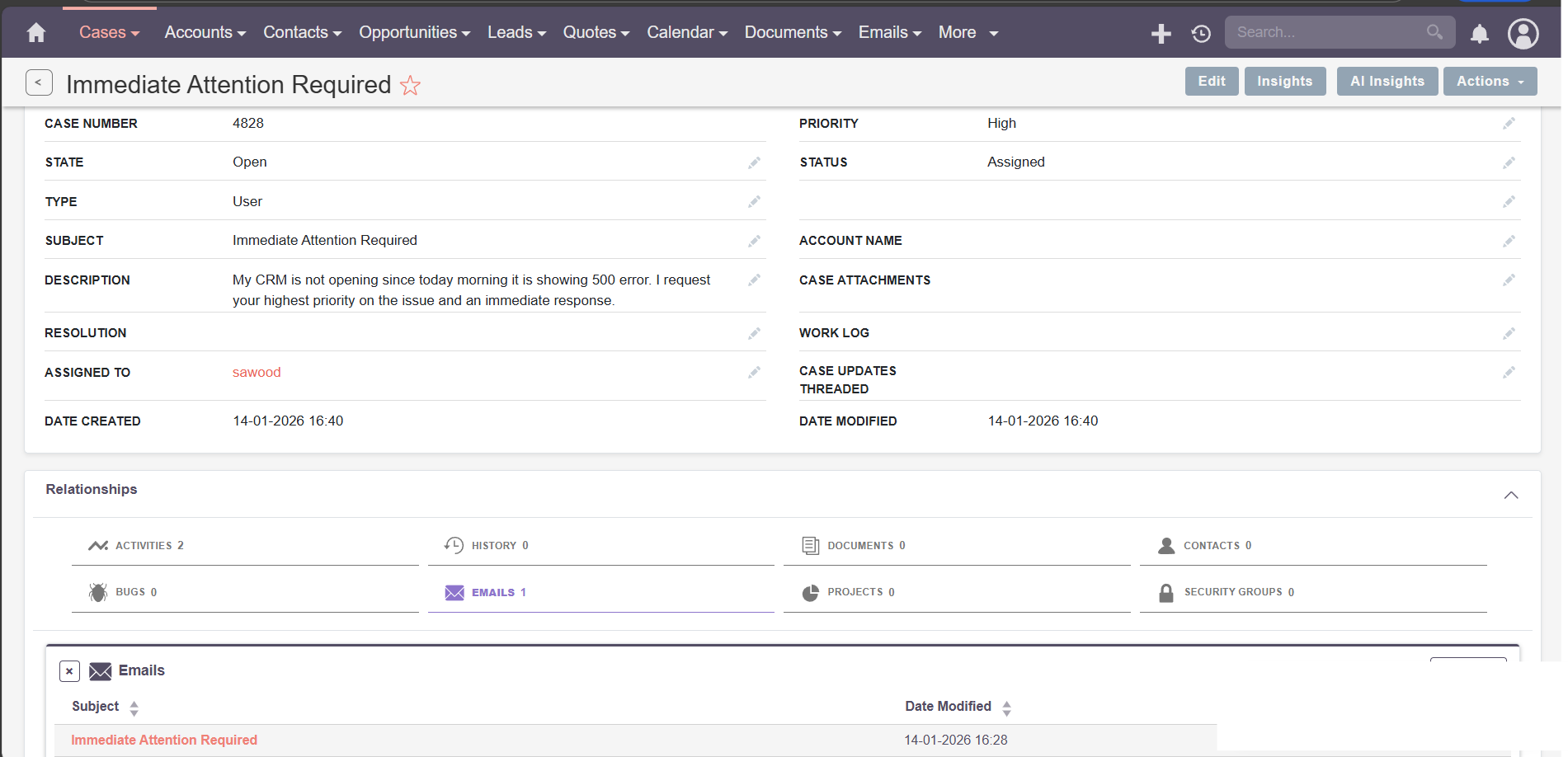
This screenshot shows a customer sending a support request email with issue details
Step 2: AI Processes the Email (Background Step no manual action)
After the email is received:
- FynRahbar Email Sense analyzes the content
- The AI identifies the email as a support issue and Case record is created
- Case categorization, priority, and assignment workflows are triggered
⏱️ This process completes within 1–2 minutes, without manual intervention.
Step 3: View the Newly Created Case in Cases Module List View
- Navigate to the Cases module in SuiteCRM.
- You will find a new case already created based on the support email.
Step 4: Review the Case Details
Open the newly created case record. You will notice that GenAI has automatically:
- Identified the issue type and sub-type
- Set the appropriate priority and status
- Captured the issue description from the email body
- Triggered assignment rules and SLA workflows
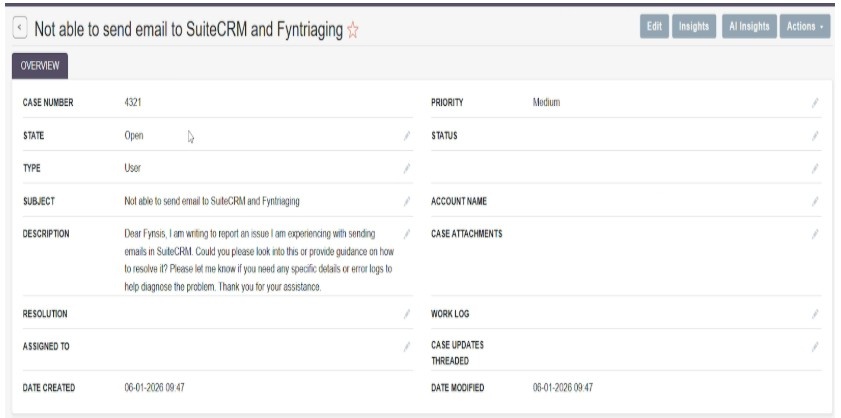
By intelligently categorizing and prioritizing the case, FynRahbar Email Sense ensures faster resolution and improved customer satisfaction.
Summary : FynRahbar Email Sense transforms every incoming email into a structured, actionable CRM record—whether it’s a sales enquiry or a support request.
Security & Compliance
- No data bypasses SuiteCRM permission model
- Role-based access fully respected
- No modification of existing records unless configured
- All actions logged within SuiteCRM
Support : For configuration help or optimization guidance Fynsis Support support@fynsis.com
Overview
FynRahbar Email Sense is an AI-powered email triaging addon for SuiteCRM that automatically analyzes incoming emails and converts them into Leads or Cases. It operates silently in the background, eliminating manual email sorting, reducing response times, and ensuring no sales enquiry or customer issue is missed.
What You’ll Notice Immediately
- No manual email sorting
- Clean, structured CRM records
- Faster follow-ups
- Reduced SLA breaches
- Happier sales & support teams
Key Capabilities
- GenAI-powered email intent detection
- Automatic Lead creation from sales enquiries
- Automatic Case creation from support requests
- Intelligent field extraction and categorization
- Seamless integration with SuiteCRM workflows and SLAs
- Role-based access control respected
How It Works (High-Level)
- Incoming email reaches configured mailbox
- SuiteCRM syncs email via scheduler
- FynRahbar AI analyzes email content
- System determines intent (Sales or Support)
- Lead or Case is created automatically
- Assignment rules and SLAs are triggered
Supported Use Cases
- Sales enquiry emails → Leads
- Customer support emails → Cases
- High-volume shared inboxes
- SLA-driven support teams
- Sales teams requiring faster follow-up
 Saving Comment...
