


Asyntai AI Chatbot
( From the Labs)Every website chat becomes a lead in SuiteCRM, with the whole conversation on the record.
User Guide
What arrives in SuiteCRM
A Lead for every new visitor
When a visitor leaves an email address or a phone number in the chat, the add-on creates a Lead. The Lead holds:
- the name, taken from the email address
- the email address and the phone number
- the lead source you chose in the settings
- a description with the page the visitor was on and the time of the first message
When the email address or the phone number already belongs to a Contact or a Lead, no new record is made. The chat is filed on the record you already have.
The whole conversation as a Note
Every chat is filed as a Note on the record. Open the History panel and you see it, with the page, the email, the phone and every message: visitor lines and answer lines together. When a human agent answered in Asyntai, the line carries the agent name.
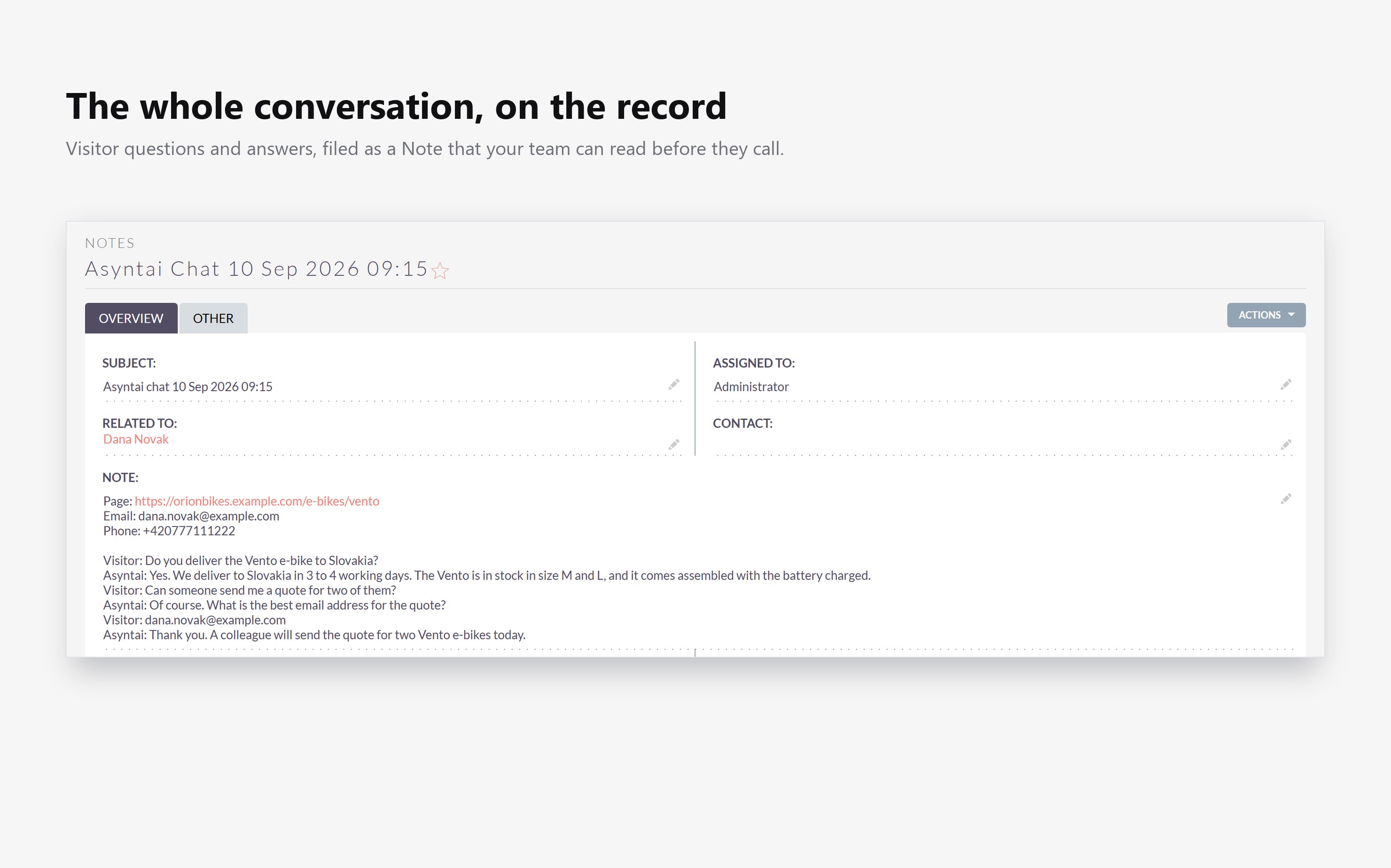
The same chat always writes to the same Note. When the visitor comes back to the chat, the next run adds the new messages to that Note instead of making a second one.
Working with the records
The Leads and the Notes are normal SuiteCRM records. Convert the Lead, assign it, add it to a campaign, or report on the lead source, the same as any other Lead.
 Saving Comment...
