


Turn any TextField type in SuiteCRM into a multi-entry field with this latest release by Business Fundamentals.
Highlevel Overview
This field allows for the adding of multiple entries, much like the current Email field. It can be used in all current modules AND custom modules. Examples include multiple names for Contact records (AKA, nick names), multiple names for Account records (trading name, business name, entity name), multiple phone records for Contacts/Accounts - whatever your CRM implementation requires.
Unlimited Entries
No longer constrained by just one field to cover the unique aspects of any given record, you will be able to add as many entries as needed to properly capture and define that record.
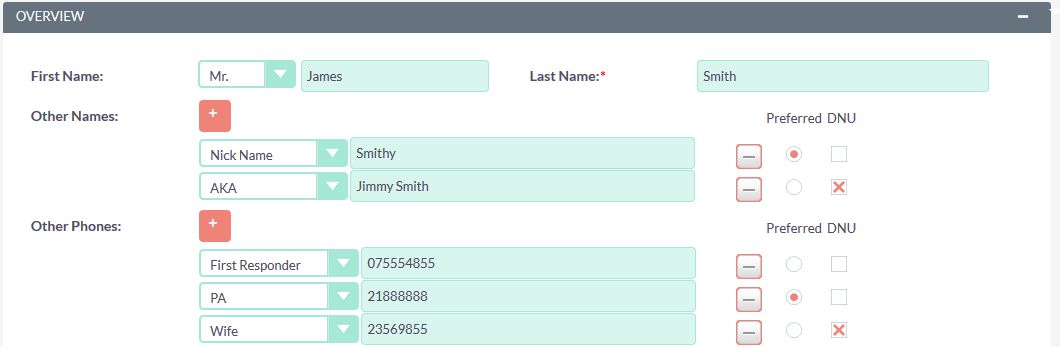
Enter It, Then See It
Once saved you will be able to see all of that important data on the record.
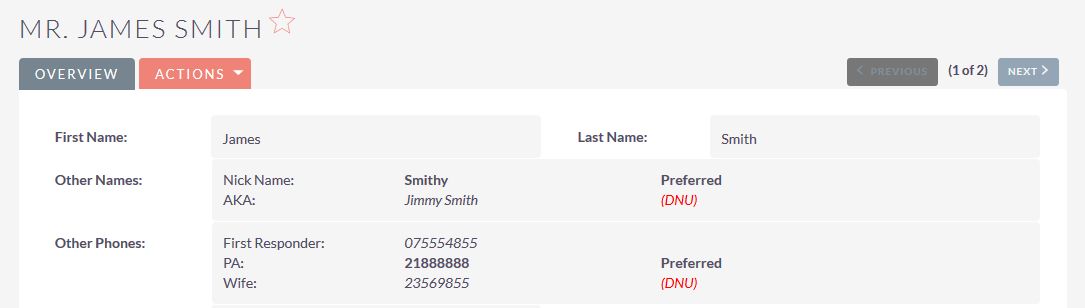
To learn more about this solution and see video demos go to MultiEntryTextField or search for "multi text".


-
Quick View

Quick View add-on for SuiteCRM helps increase the visibility of CRM record data in an easier, simpler, more customizable way. It just takes a mouse click to the Quick View icon in order to view key fields and stay productive.
-
Import to Dropdown fields

Import to Dropdown Fields helps users manage large data sets that need to be imported to dropdown fields for modules of SuiteCRM. For example, if you have a country dropdown and you need to add entries for all countries, it would take hours to add that data. This plugin saves time by allowing users ...
- Show more addons