

Attach and manage ownCloud files directly from SuiteCRM records. Upload documents with drag-and-drop, view linked files in a dedicated subpanel, and open them in ownCloud with one click — without leaving SuiteCRM. Supports both v7 and v8. Your files stay on your server.
MTS ownCloud Integration for SuiteCRM
Attach and manage ownCloud files directly from SuiteCRM records — no tab-switching required.
Overview
MTS ownCloud Integration connects SuiteCRM to your self-hosted ownCloud server, making file management a natural part of your CRM workflow. Upload documents, contracts, and attachments directly from any record in SuiteCRM. Files are stored in ownCloud under an automatic folder structure and linked back to the record in a dedicated subpanel — accessible to your whole team without leaving SuiteCRM.
Whether you are running SuiteCRM v7 or the modern SuiteCRM v8, the extension delivers a native, seamless experience on both platforms.
Screenshots
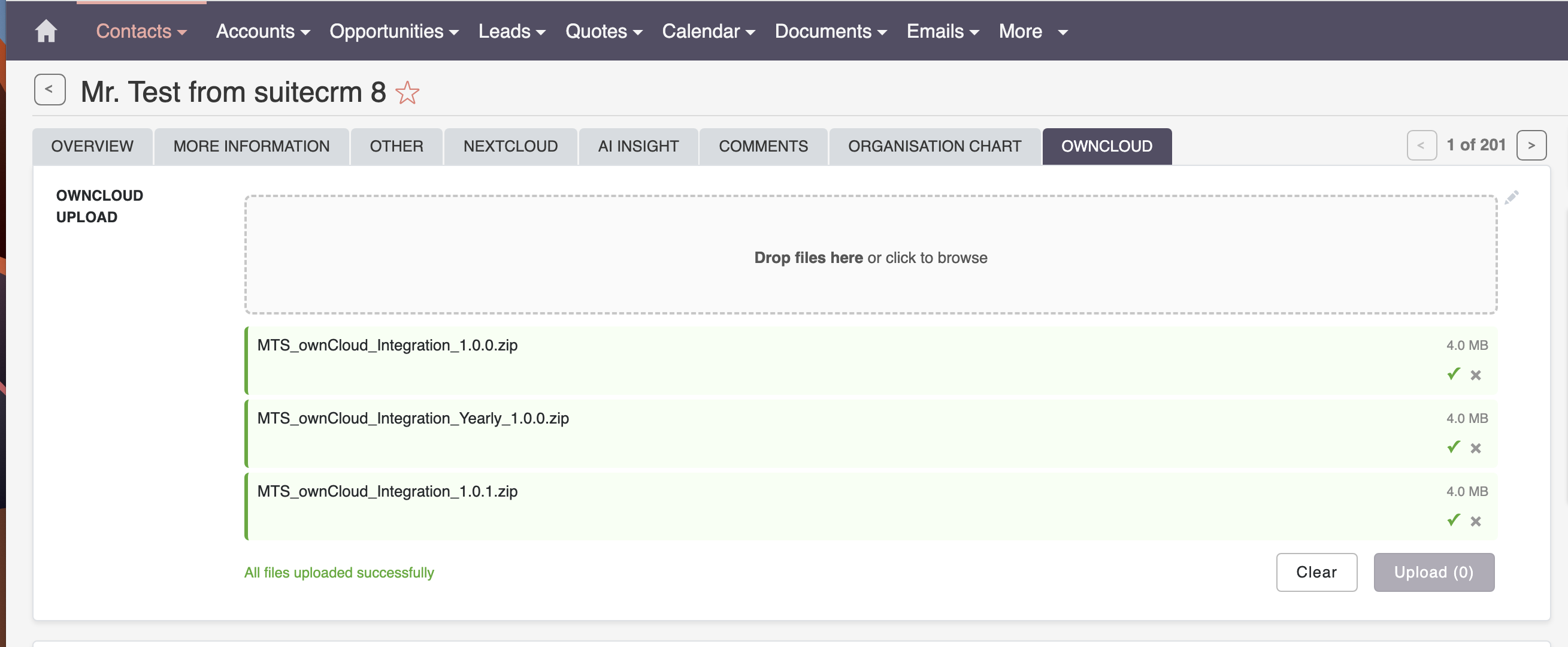 SuiteCRM v8 — ownCloud tab on an Account record showing the upload widget and linked files subpanel
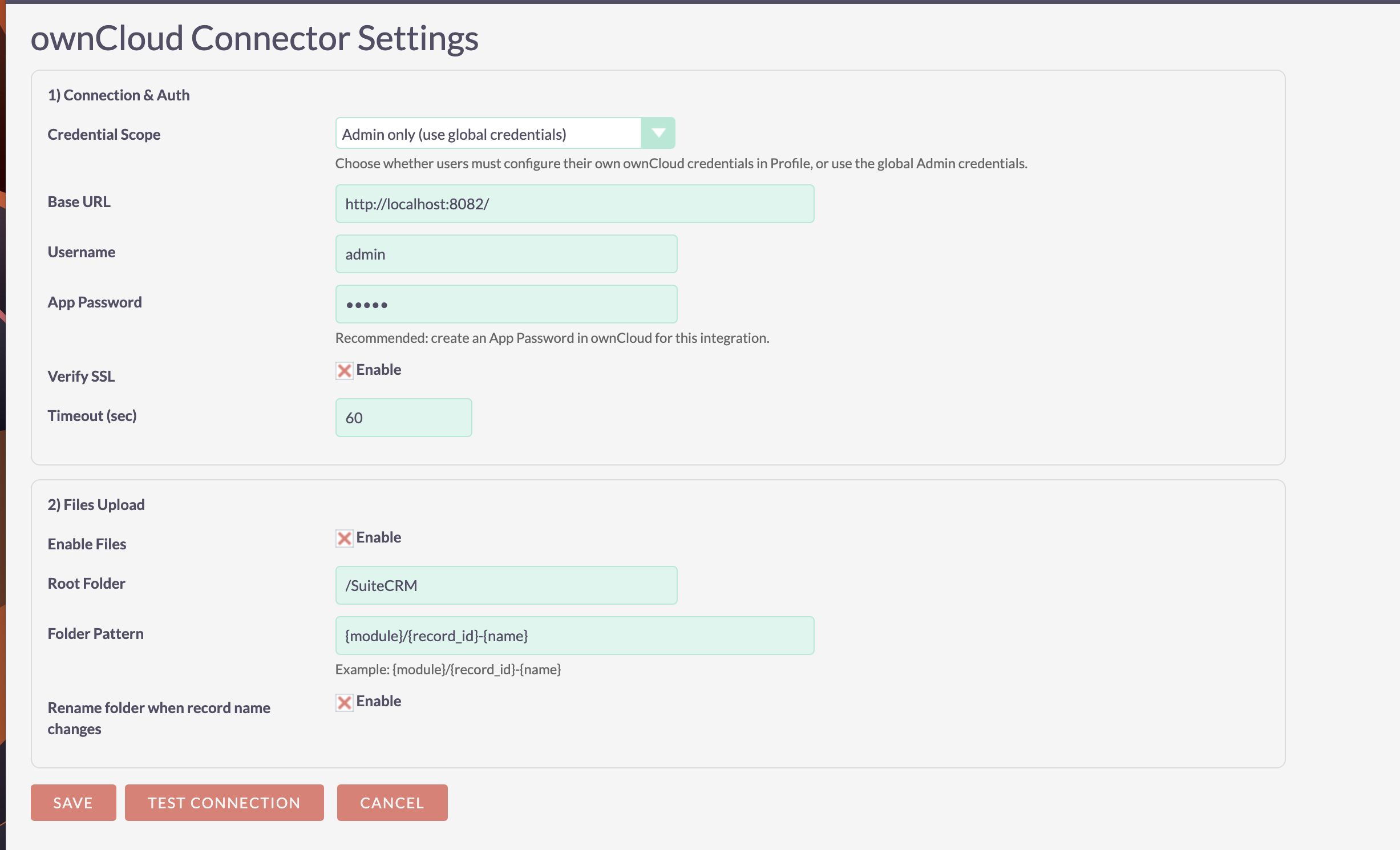 Admin panel — configure ownCloud server connection and file upload settings
Key Features
File Upload & Management
- Drag-and-drop file upload directly from any module's detail view (Accounts, Contacts, Opportunities, Cases, and more)
- ownCloud Files subpanel — every linked file appears on the record with its name, size, and a direct open link
- Automatic folder structure — files are organized in ownCloud by module and record name:
SuiteCRM / {Module} / {Record Name} / file - Per-module control — enable file integration only on the modules your team actually uses
Native SuiteCRM v8 Support
- Built as a proper Angular Module Federation extension
- Upload widget renders natively inside v8 detail views — no iframes, no popups
- Matches the SuiteCRM v8 UI theme out of the box
- Upload queue with per-file progress indicators and queue management
Admin Controls
- Centralized admin panel under Administration → MTS ownCloud Integration
- Per-module enable/disable — full control over which modules get ownCloud integration
- Connection test tool — verify WebDAV connectivity before going live
- License management from within the admin panel
Compatibility
| Version | |
|---|---|
| SuiteCRM | 7.x and 8.x |
| ownCloud | 10.0 and above |
Licensing
Available in two plans:
- Yearly License — annual subscription with continuous updates and priority support
Licenses can be activated directly from the SuiteCRM admin panel.
Pricing
| Package | Price |
|---|---|
| Yearly | View Price |
| One Time | Contact us |
More add-on may you need
History Time Line: See everything in a single timeline view MTS Subpanel Search: QUICK SEARCH ANY INFORMATION IN A SUBPANEL MTS Field Highlight: Highlight important fields, dropdown options on a record MTS Notification: Notify users whenever they are assigned a record for any module in App
Our SuiteCRM Plugins Now Support SuiteCRM 8
All plugins developed by our team are now fully compatible with SuiteCRM 8.
If you are upgrading to SuiteCRM 8, you can continue using these extensions without any compatibility issues.
Productivity and Visualization
- History Time Line - Visualize record history in a timeline.
- MTS Organisation Chart - Display company hierarchy with an organisation chart.
- MTS Kanban - Manage records using a Kanban board.
Developer and Admin Tools
- MTS Code Generator - Generate SuiteCRM modules and components faster.
- MTS Dynamic View - Dynamically show or hide fields based on conditions.
- MTS Cleaner - Clean unnecessary files and optimize SuiteCRM performance.
Business and Finance
- MTS Advanced Invoice - Advanced invoicing features for SuiteCRM.
- MTS Stripe Integration - Accept payments directly from SuiteCRM.
Automation and Integrations
- MTS Notification - Real-time notifications for CRM events.
- MTS Telegram Notify - Send SuiteCRM notifications to Telegram.
- MTS Typeform Integration - Sync Typeform responses into SuiteCRM.
AI and Collaboration
- MTS AI Email Writer - Generate professional emails using AI.
- MTS Comment - Add discussion threads inside records.
- MTS Record Score - Automatically score records based on rules.
Utilities
- MTS Field Highlight - Highlight important fields in record views.
- MTS Language Translate Tool - Translate SuiteCRM labels easily.
- MTS User Activity Log - Track user activity in SuiteCRM.
- MTS Timesheet - Track working time inside SuiteCRM.
- SuiteCRM 8 Theme Editor - Customize SuiteCRM 8 themes without coding.
About MTS
MTS builds productivity extensions for SuiteCRM focused on real-world business workflows. Our extensions are actively maintained, well-documented, and designed to integrate cleanly with SuiteCRM's architecture on both v7 and v8.
