


The MTS Organisation Chart add-on uses your SuiteCRM data to create a visual representation of businesses and their reporting structures. For potential customers, gain a better understanding of connections, how teams work together, and what contacts are involved in the decision-making process.
Highlevel Overview
Developed by the team at SuiteCRM Addon, MTS Organisation Chart displays a hierarchy of customer data to portray superior and subordinate relationships or contacts involved in the decision-making process, all within the account you're viewing in SuiteCRM. Based on the organisation chart, you will understand the role of the contact you are working with and any other key relationships that can help drive sales opportunities. The chart is created based on "Reports To" field in the Contacts module.
Key Features
- Visualize the reporting structure of your contacts with organisation charts
- Easily see who a contact reports to within the Contacts module
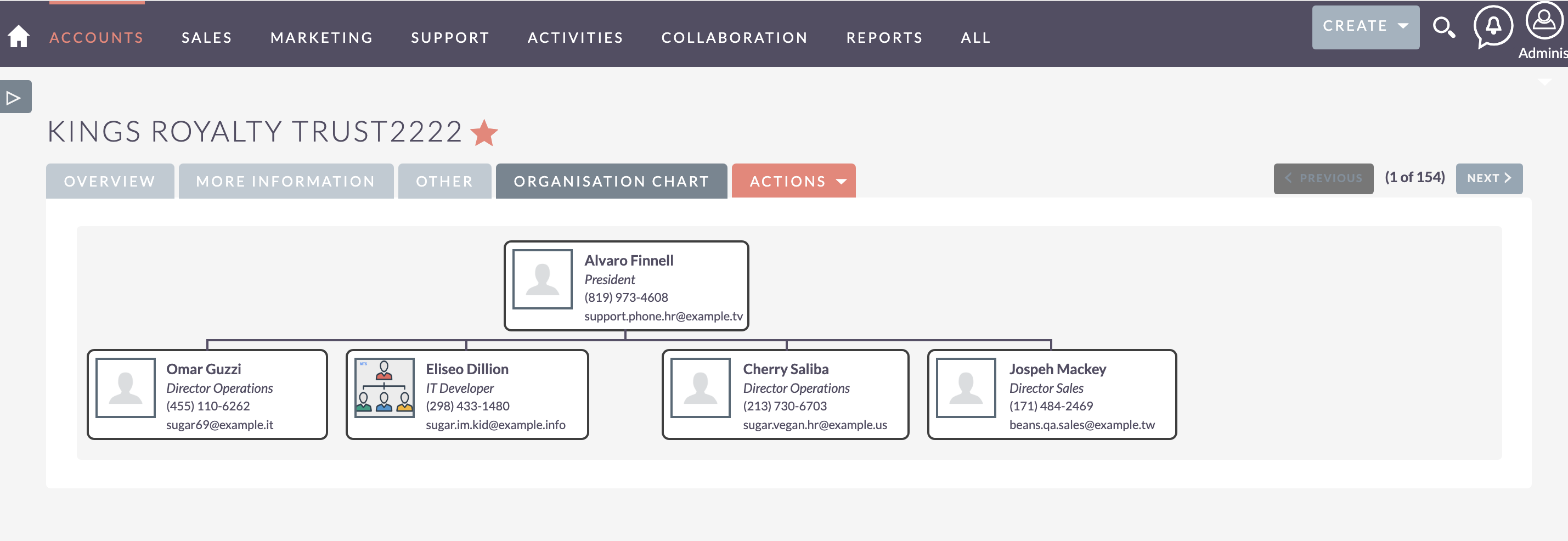
To learn more about this solution, go to MTS Organisation Chart or search for "org chart."
-
Internal Note

The Internal Note add-on for SuiteCRM helps you easily communicate with teammates in an organized way, without having to switch tabs to a different messaging program. Write daily, internal-only notes and keep everyone updated in one convenient place that is also related to the CRM record.

-
MTS User Activity Log
MTS User Activity Log is a tool that helps SuiteCRM admins easily track their users’ activities while working in the system. Another key feature is the ability for admins to revert or restore any record that has been updated or accidentally deleted by another user.
- Show more addons