


This post was contributed by Zybroz, a SuiteCRM technology partner specializing in AI-powered sales intelligence tools.
If you manage a sales team on SuiteCRM, you probably know the Sunday night ritual. You log in, pull multiple CSV exports, wait for them to download, then spend an hour building pivot tables and color-coding cells to highlight stalled deals. By the time Monday's standup begins, the numbers are already out of date and the conversation turns into a debate over whose spreadsheet is right.
Revenue Engine AI by Zybroz was built to eliminate that cycle. It transforms the data already sitting in your SuiteCRM into a live revenue command center -- no spreadsheets, no external tools, and no changes to your database.
What Changes When You Install It
The first thing you notice is the Revenue Command Center: a single screen that consolidates the metrics you were previously stitching together by hand. Pipeline value, weighted forecast, win rate, average sales cycle, and pipeline coverage ratio are all live and updating as your team works. The built-in intelligence engine generates deterministic summaries and signals without any configuration -- you get coaching insights and deal risk scoring from day one.
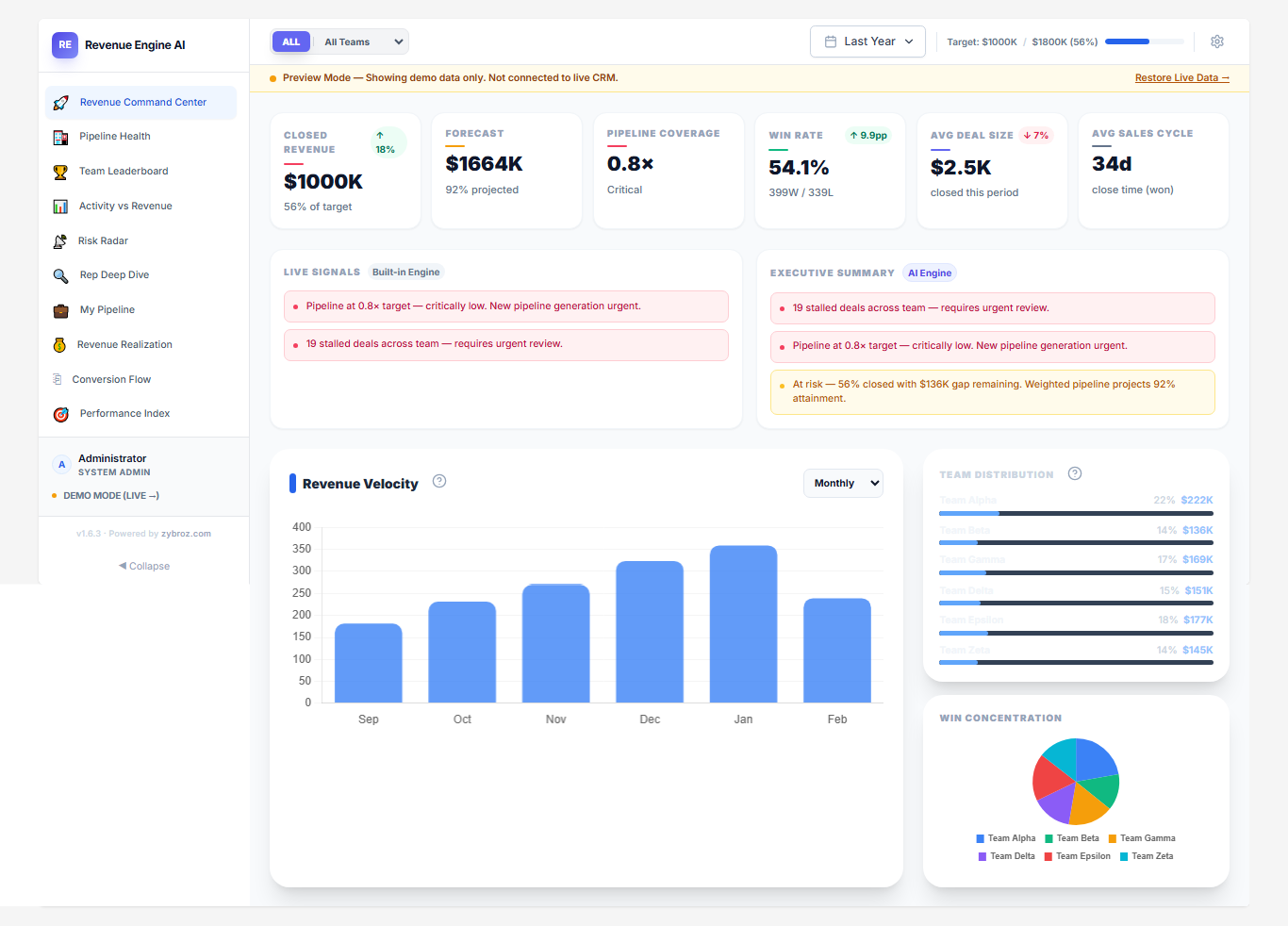
For teams that want richer narrative summaries, the add-on supports a Bring Your Own Key model for OpenAI, Google Gemini, or Anthropic Claude. You paste in one API key, the system auto-detects the provider, and the executive summaries shift from rule-based signals to natural language briefings. Keys are stored in your browser's local storage only -- no CRM data or credentials are sent to Zybroz servers.
Catching Deals Before They Die
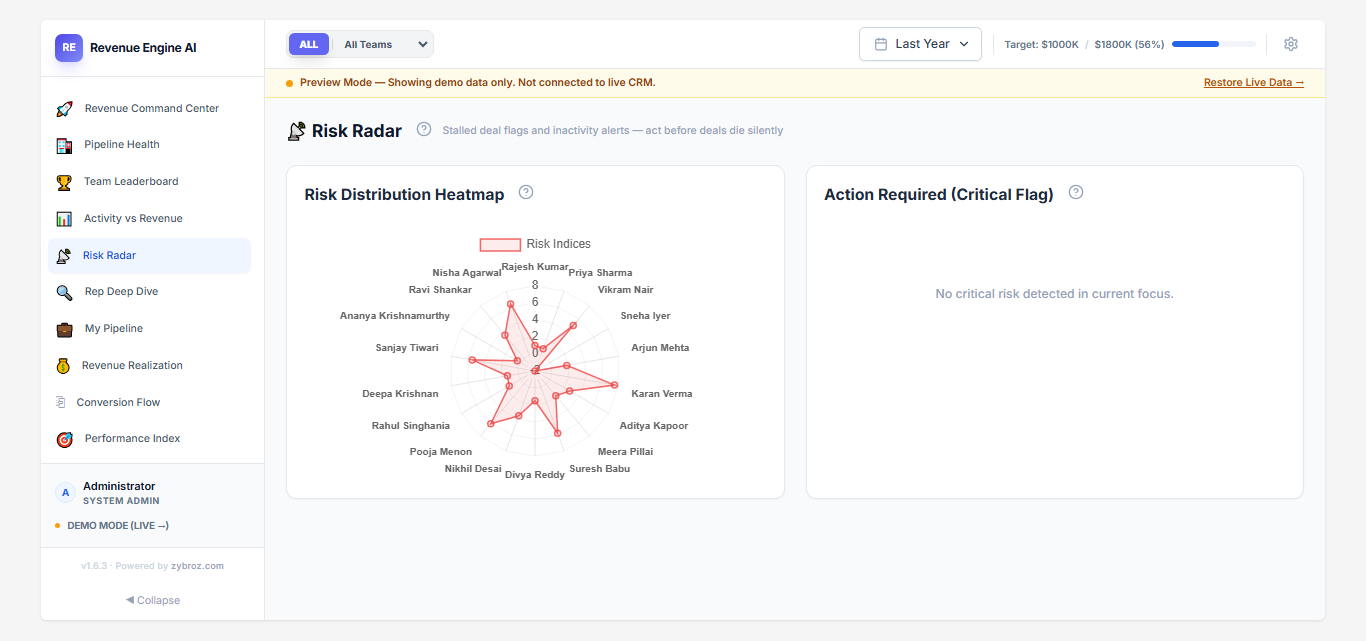
One of the harder problems in pipeline management is spotting stalled deals before they're lost. Revenue Engine AI addresses this with what it calls the Risk Radar. The system monitors every open opportunity for activity gaps and flags them with color-coded silence badges -- amber when a deal has been quiet for 8 days, rose when it crosses 21 days. Instead of manually scanning records to find deals that have gone cold, you get a prioritized list of opportunities that need attention right now.
This pairs with the Revenue Realization Funnel, which maps the journey from Quote to Order to Invoice to Cash. If revenue is getting stuck somewhere in that chain -- quotes not converting to orders, invoices not getting paid -- the funnel shows you exactly where the bottleneck is.
Understanding Your Team's Performance
Sales leadership often struggles to evaluate reps fairly. Raw revenue numbers favor reps who inherited large accounts, while activity counts reward busywork over results. Revenue Engine AI takes a different approach with its Performance Index, a composite score weighted across four dimensions: revenue contribution (40%), conversion efficiency (30%), activity volume (20%), and a risk penalty (up to -10%) for reps with too many stalled deals.
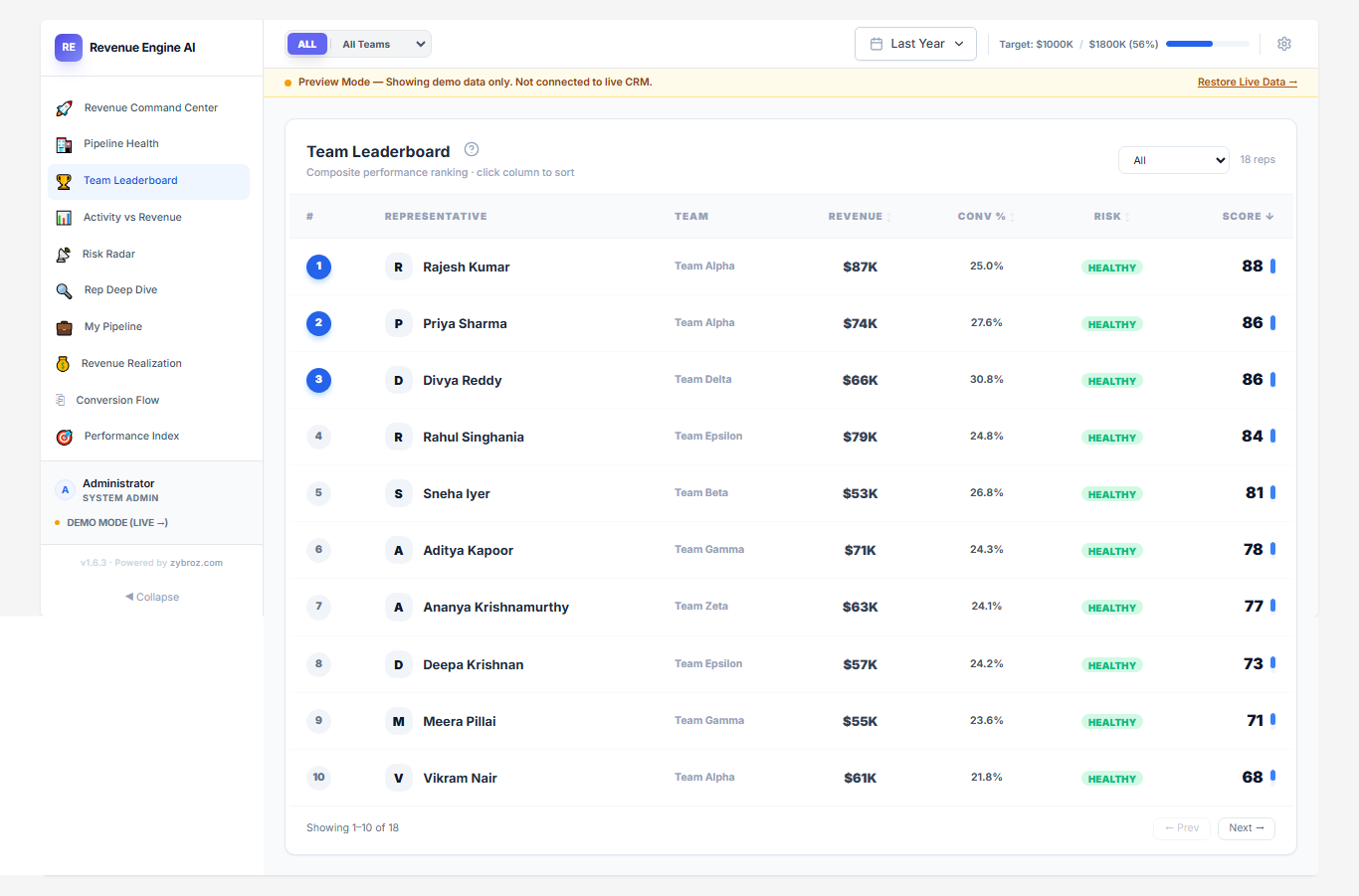
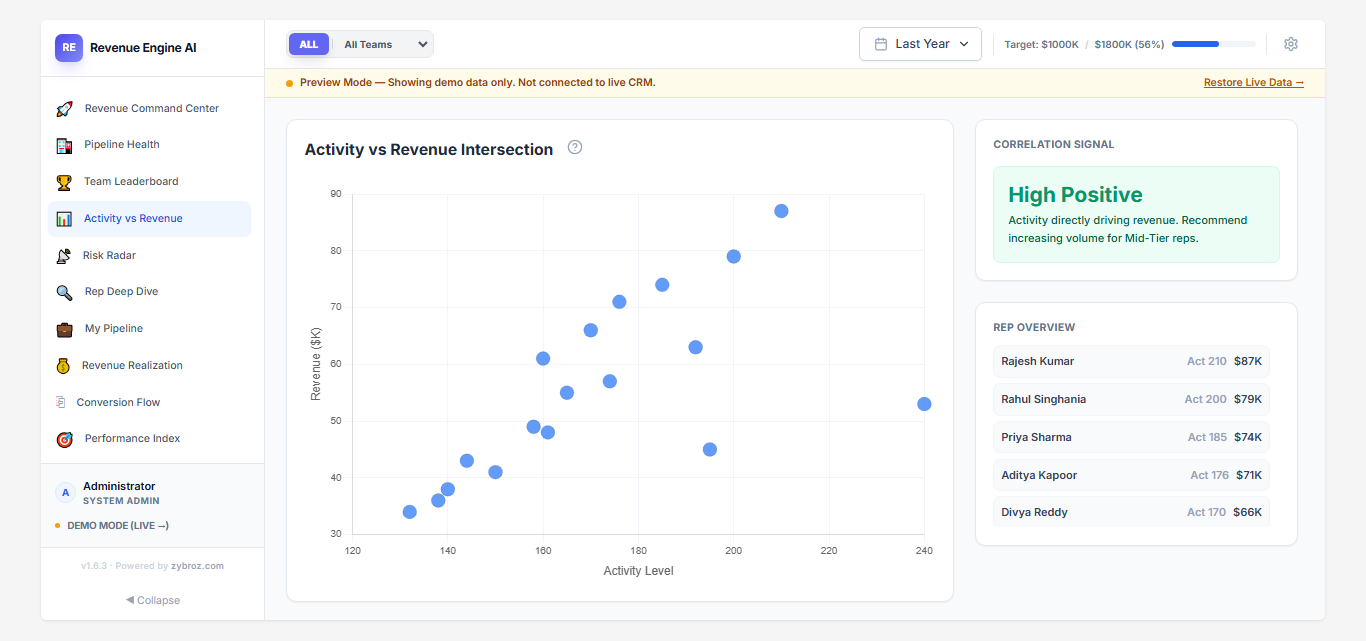
The Team Leaderboard ranks your reps using this index, and the Activity vs. Revenue scatter chart shows you whether a rep's effort is translating into results. These views give managers the data they need for constructive one-on-ones -- you can see at a glance whether someone needs help with conversion technique or simply more pipeline.
What It Looks Like in Practice
Consider the Monday standup. Instead of debating static spreadsheets, a manager opens the Team Leaderboard and reviews each rep's Performance Index score. The conversation shifts from "what happened last week" to "where should we focus this week" -- stalled deals are already flagged, at-risk accounts are highlighted, and the forecast gap is calculated in real time.
Or mid-quarter, when a VP of Sales checks pipeline health and spots a cluster of deals stuck in the Negotiation stage. Rather than discovering this at quarter-end, they can intervene early -- triggering a targeted push to unstick those deals or generate new pipeline to cover the gap.
When it's time for a board meeting, the one-click PDF and PNG export turns any dashboard view into a presentation-ready report in seconds, replacing the hours typically spent building executive slide decks.
Watch Revenue Engine AI in Action
How It Works Under the Hood
Revenue Engine AI installs in about five minutes through the standard SuiteCRM Module Loader. After upload, a post-install hook runs Quick Repair & Rebuild automatically. A guided onboarding wizard walks you through team configuration -- grouping reps by Security Groups, Department fields, or ACL roles -- and setting your quarterly revenue target. A Data Readiness Check scans your CRM to make sure your Opportunities, Users, and Activity data are populated correctly before the dashboard launches.
The architecture is entirely read-only. A PHP data bridge pulls from your existing SuiteCRM tables without writing to them, modifying your schema, or syncing data to external services. This means no risk to your existing setup and no complications for future CRM upgrades. Role-based visibility ensures reps see their own data, managers see their teams, and admins see everything.
The add-on includes a Demo Mode loaded with a sample SaaS dataset, so you can explore every feature before connecting your live data. It is compatible with SuiteCRM versions 7.x and 8.x.
To learn more about this solution, go to Revenue Engine AI or search for 'revenue engine' on the SuiteCRM Store. A free trial is available.
-
Quick Updater
Quick Updater makes it possible for you to Update the Module Record information from Listview, Update Related Field & Parent Relate Field information directly from Modules Create/Editview where Related fields Display. This will help you to quickly update records as you no longer need to save and the...

-
RT SalesMap

Visualize your CRM data! Integrate Google Maps with SuiteCRM to see leads, contacts, and accounts on a map. Plan routes, optimize sales efforts. Effortless location intelligence.
- Show more addons
