


This post was contributed by Mien Trung Software, a SuiteCRM add-on developer with over 20 plugins focused on productivity, workflow, and administration tools.
If you have ever needed to piece together a customer's history in SuiteCRM, you know the routine. Open the contact record. Scroll through subpanels. Click into a call to read the notes, then navigate back. Switch to emails, scan for context, and click into the next one. Open the tasks panel to see what was assigned, check whether it was completed, then try to remember when all of these things happened relative to each other. The information is there — it is just scattered across half a dozen subpanels with no shared sense of time.
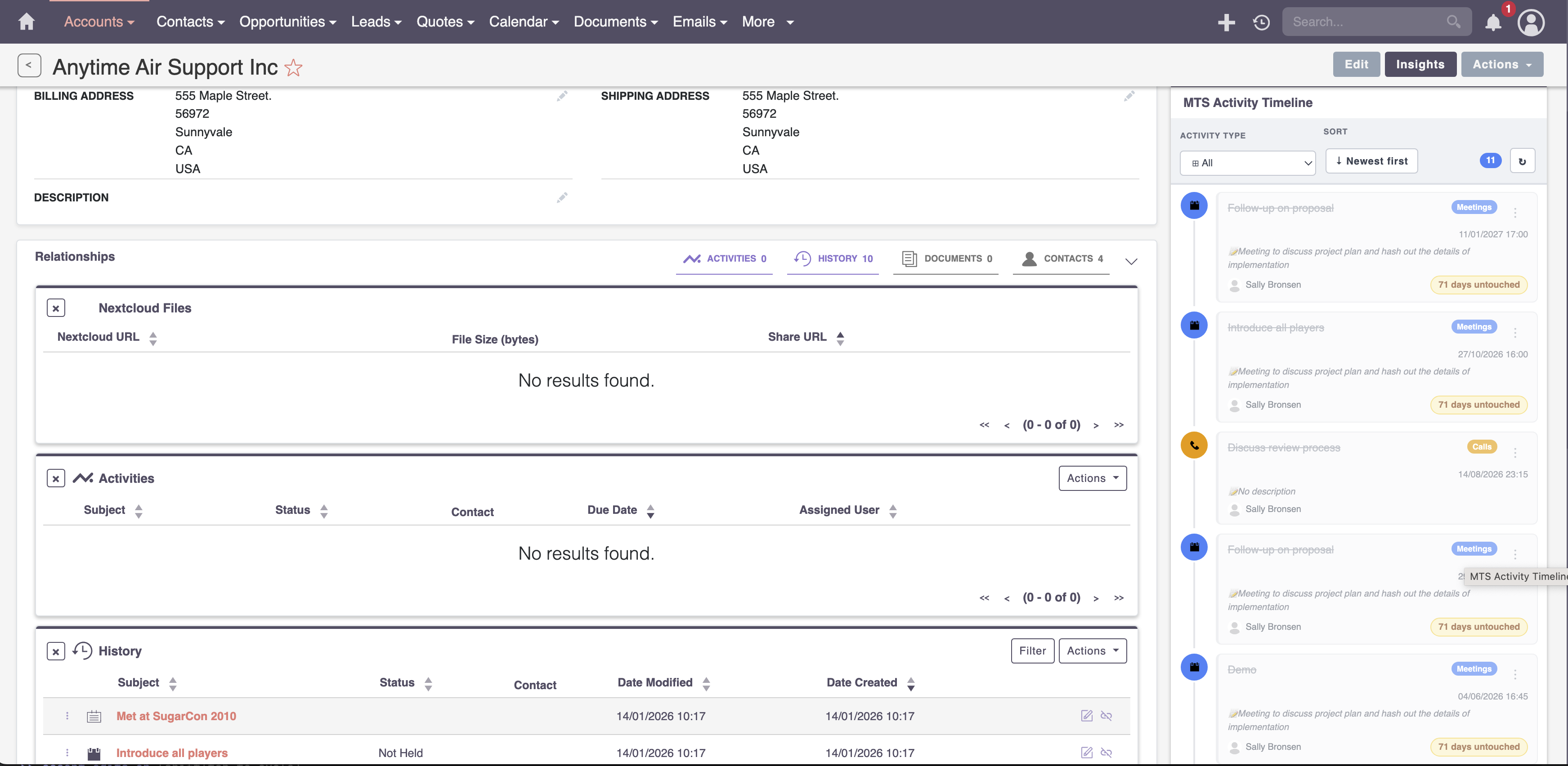
MTS History Time Line by Mien Trung Software solves that problem by pulling calls, meetings, tasks, emails, notes, FP events, and record change logs into a single, chronological timeline. Instead of jumping between panels and losing your place, you see everything that has happened with a contact or account laid out in the order it actually occurred.
Everything in One Place, in the Order It Happened
The core value of History Time Line is straightforward: it replaces the back-and-forth between subpanels with one unified view. Every call, meeting, email, task, note, and FP event tied to a record appears on a single timeline, sorted by date. Record change logs are included too, so you can see not only what happened but when key fields were updated along the way.
This matters most during live conversations. When a customer calls and references something from three weeks ago, you should not have to dig through five panels to find it. The timeline gives you that context at a glance, presented in the sequence it occurred.
Dig Into the Details Without Leaving the Page
Seeing what happened is only half the story. You also need to read the details — the body of an email, the description on a task, the notes from a meeting. History Time Line handles this with inline modals that let you open the full details of any activity directly from the timeline. You get the information you need without navigating away from the record and losing your place in the chronology.
This quick-access approach keeps you in context. Rather than clicking into a call record, reading it, hitting the back button, and trying to find where you left off, you stay on the timeline and move through the history naturally.
Roll Up the Full Account Picture
Individual contact timelines are useful on their own, but the real picture often lives at the account level. History Time Line aggregates activities from all contacts associated with an account into a single account-level timeline. If three different people at the same company have had calls, received emails, or been assigned tasks, you see all of that activity together.
For account managers and sales teams working with multi-contact organizations, this is the difference between knowing what happened with one person and understanding the full relationship. You do not have to open each contact record individually to build a mental picture of the account's history.
Filter and Sort to Find What Matters
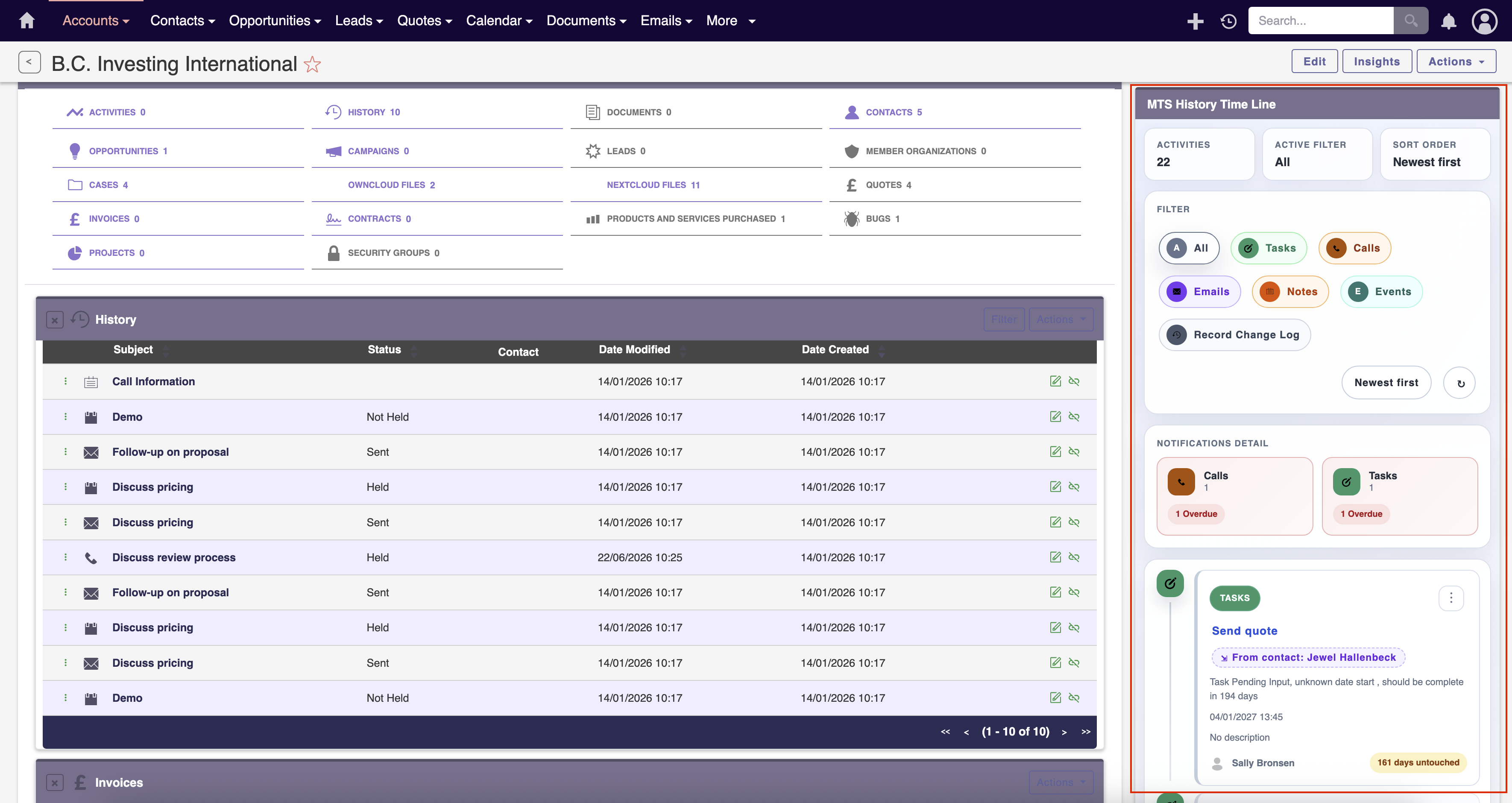
A timeline that shows everything is helpful. A timeline that lets you narrow down to exactly what you need is even better. History Time Line includes advanced filtering by activity type, so you can isolate just the emails, just the calls, or just the tasks. If you use FP Events, there is a dedicated filter for those as well.
Sorting options let you flip between chronological and reverse-chronological order depending on whether you need the most recent activity first or want to trace the history from the beginning. When a record has months or years of interactions, these filters turn a long list into a focused view of exactly the activity type you are looking for.
Stay Ahead with Activity Notifications
History Time Line does not just show you the past — it also helps you stay on top of what is coming and what has slipped. The add-on surfaces notifications for overdue tasks, overdue calls, and upcoming activities directly within the timeline view. If a follow-up call was due yesterday or a task deadline passed without completion, you see it flagged without having to run a separate report or check your dashboard.
You can also mark activities as complete directly from the timeline and add notes as you do, keeping your workflow within a single view rather than opening each record individually to update its status.
Simplified Administration in v3.0.0
Version 3.0.0 introduced a redesigned administration panel that simplifies how you configure the timeline. The settings are consolidated into a cleaner layout, making it easier to control which activity types appear, how notifications behave, and how the timeline displays across your instance. If you have used earlier versions, the upgrade streamlines the setup process noticeably.
Works Where You Do
History Time Line is fully responsive across desktop, tablet, and mobile browsers. Whether your team is at their desks or checking records on the go between meetings, the timeline adapts to the screen without losing functionality. The add-on supports SuiteCRM versions 7.0.0 through 8.9.3, so it works with both legacy and current installations.
The product carries a 5.0 star rating on the SuiteCRM Store and is backed by the store's 30-day money-back guarantee, so you can try it on your own instance with confidence.
To learn more about this solution, go to MTS History Time Line or search for "history timeline" on the marketplace.
-
Advanced Menu Manager

Configure stylish and functional menus in SuiteCRM that are more relevant to your team’s needs and match your branding. The Advanced Menu Manager add-on enables you to choose different menu layouts and designs from the Admin settings – no designer needed!
-
Any Telephony Connector

Any Telephony Connector is a computer telephony integration between SuiteCRM and all modern PBXs provided by VoIP softphone provider, Softphone.Pro.
-
CRM Assistant for Gmail™

Boost sales efficiency with SuiteCRM Integration for Gmail. Link emails, and manage data & tasks directly from your inbox.

- Show more addons
