Close Error Message
Close Notice Message
Close Success Message
The SuiteCRM Store - Turn SuiteCRM into everything you need.
  • Browse Add-ons
    • Store Home
    • SuiteCRM Home
    • All Add-ons
    • Administration
    • Integrations
    • Marketing
    • Productivity
    • Reporting
    • Sales
    • Social
    • Labs
    • Language Packs
  • Blog
  • Login/Signup
  • Cart
  • All
  • Administration
  • Integrations
  • Marketing
  • Productivity
  • Reporting
  • Sales
  • Social
  • Labs
Author avatar for jason

Create Your Own Custom Validation Messages

Posted by Jason on May 20, 2019

If you ever have the need to fine tune the the validation messages in SuiteCRM then Custom Validation Message is the right tool for you.

Highlevel Overview

Create your own custom validation messages for SuiteCRM. For each field, configure the validation message shown on the edit view page when a field does not pass the validation requirements.

Modify Validation Messages
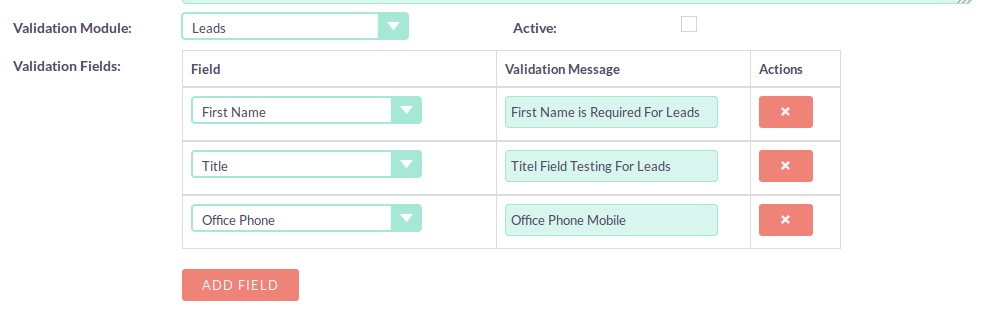
Modify SuiteCRM Validation Messages

See Them in Action
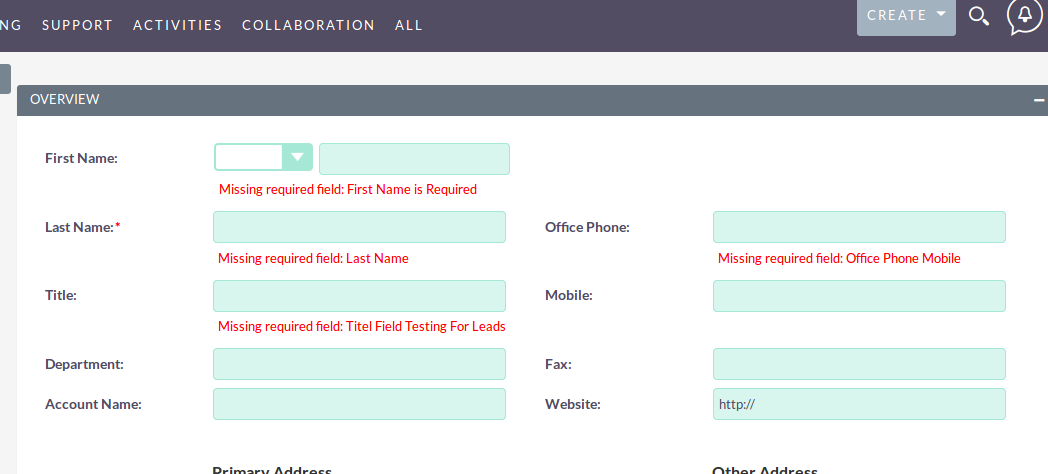
Display Custom SuiteCRM Validation Messages

To learn more about this solution go to Custom Validation Message or search for "validation".

Like this post?

We'll send you an email once a month with the latest posts.

Subscribe to this blog

Custom Validation Message

Custom Validation Message Logo

Create your own custom validation messages for SuiteCRM. For each field, configure the validation message shown on the edit view page when a field does not pass the validation requirements.

Random Spotlight
  • E-signature Field

    E-signature Field Logo

    Electronic signatures provide a binding way to authenticate a document. We have simplified this in SuiteCRM with an easy-to-use electronic signature capture and embed tool. You can use the E-Signature Field add-on in any default module of SuiteCRM.

    Rating
  • Fields Color

    Fields Color Logo

    SuiteCRM Fields Color add-on allows you to display color-coded fields based on specific conditions set for the record so you can quickly identify CRM records that need attention. In Settings, configure colors for each module and specify Text, Background, and Related Record Colors.

  • Show more addons
  • Home
  • Blog
  • Contact Us
  • Labs
  • Privacy
  • Terms
  • Sell Add-ons
  • Partner With Us

Log In

  • forgot password?
    Logging In
Don't have an account yet? Create one now.
  • Creating Account