

MTS Duplicate Check is a SuiteCRM 8 plugin that warns users about duplicate records in real time — before anything is saved. When a match is found, a popup shows the existing records so users can decide whether to proceed or update the one already in the system.
MTS Duplicate Check — The Duplicate Records Plugin for SuiteCRM 8
What's New in Version 1.0.2
New Features
One-Click Merge from the Duplicate Warning
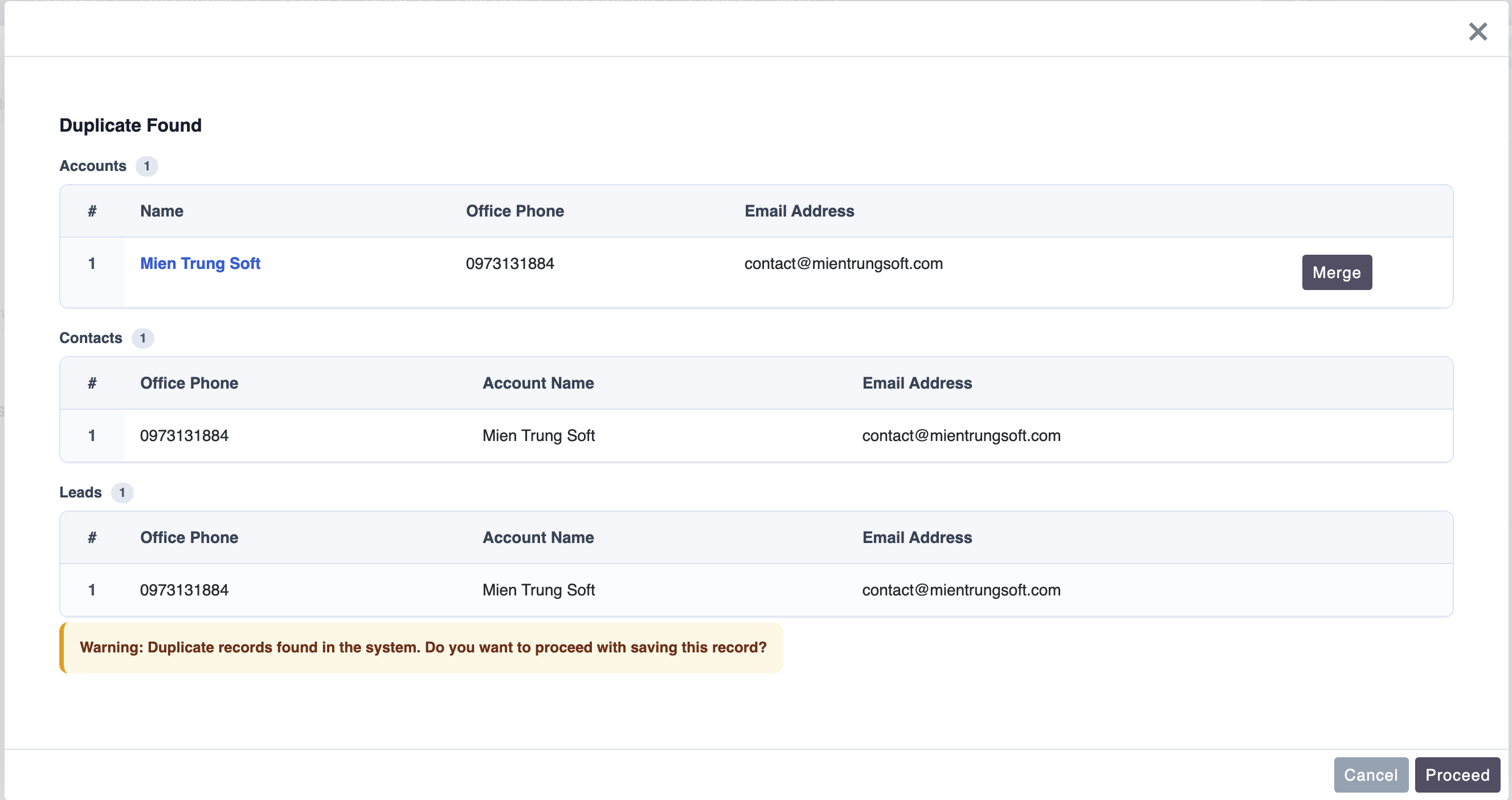
 - When the duplicate warning appears while creating a record, each matching record now has a Merge button
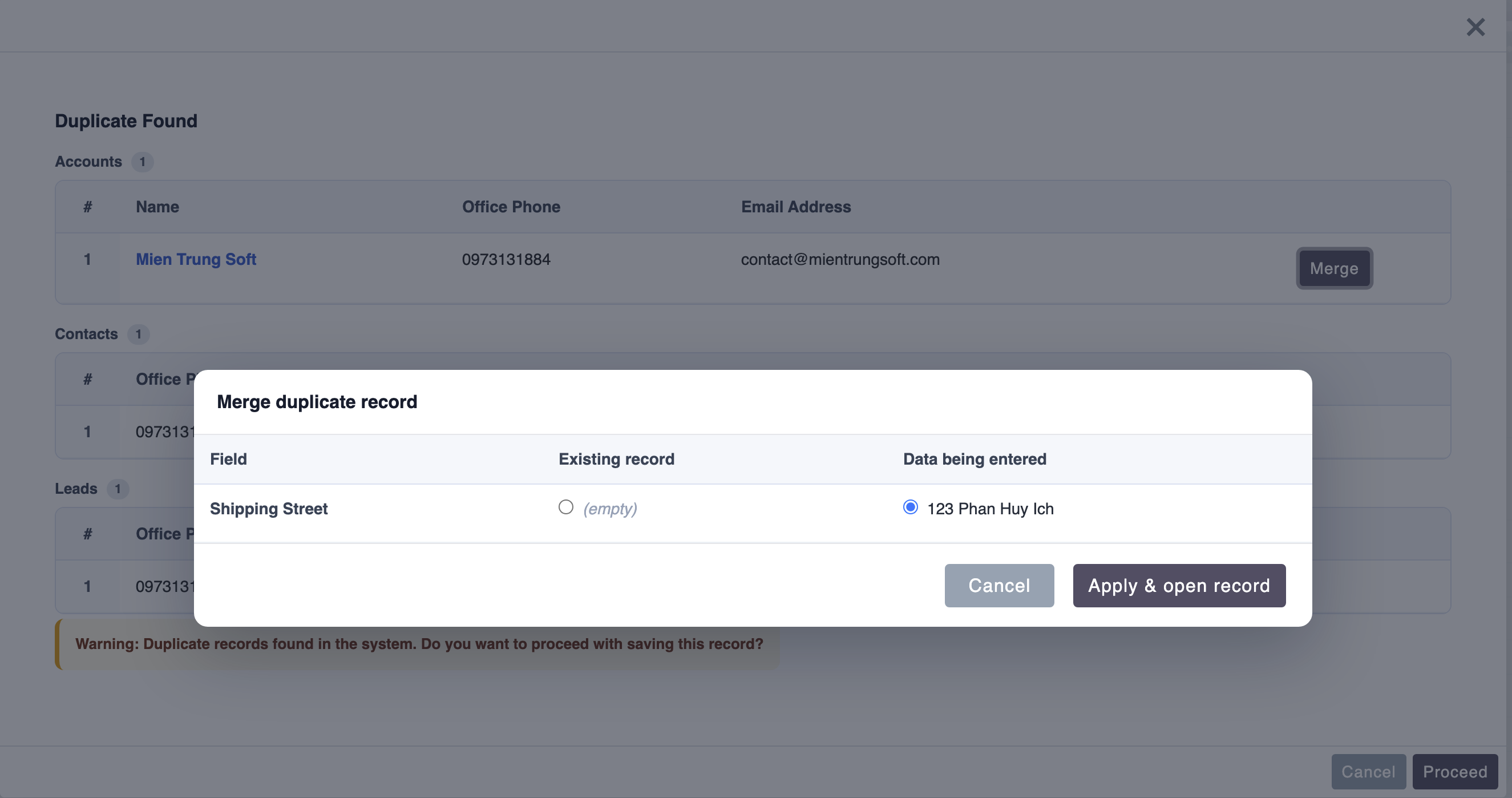
- Clicking Merge opens a side-by-side comparison of the existing record against the data you just entered, with a per-field choice of which value to keep
- Confirming writes the chosen values into the existing record and opens it — no duplicate record is created
- When the duplicate warning appears while creating a record, each matching record now has a Merge button
- Clicking Merge opens a side-by-side comparison of the existing record against the data you just entered, with a per-field choice of which value to keep
- Confirming writes the chosen values into the existing record and opens it — no duplicate record is created
Merge While Editing
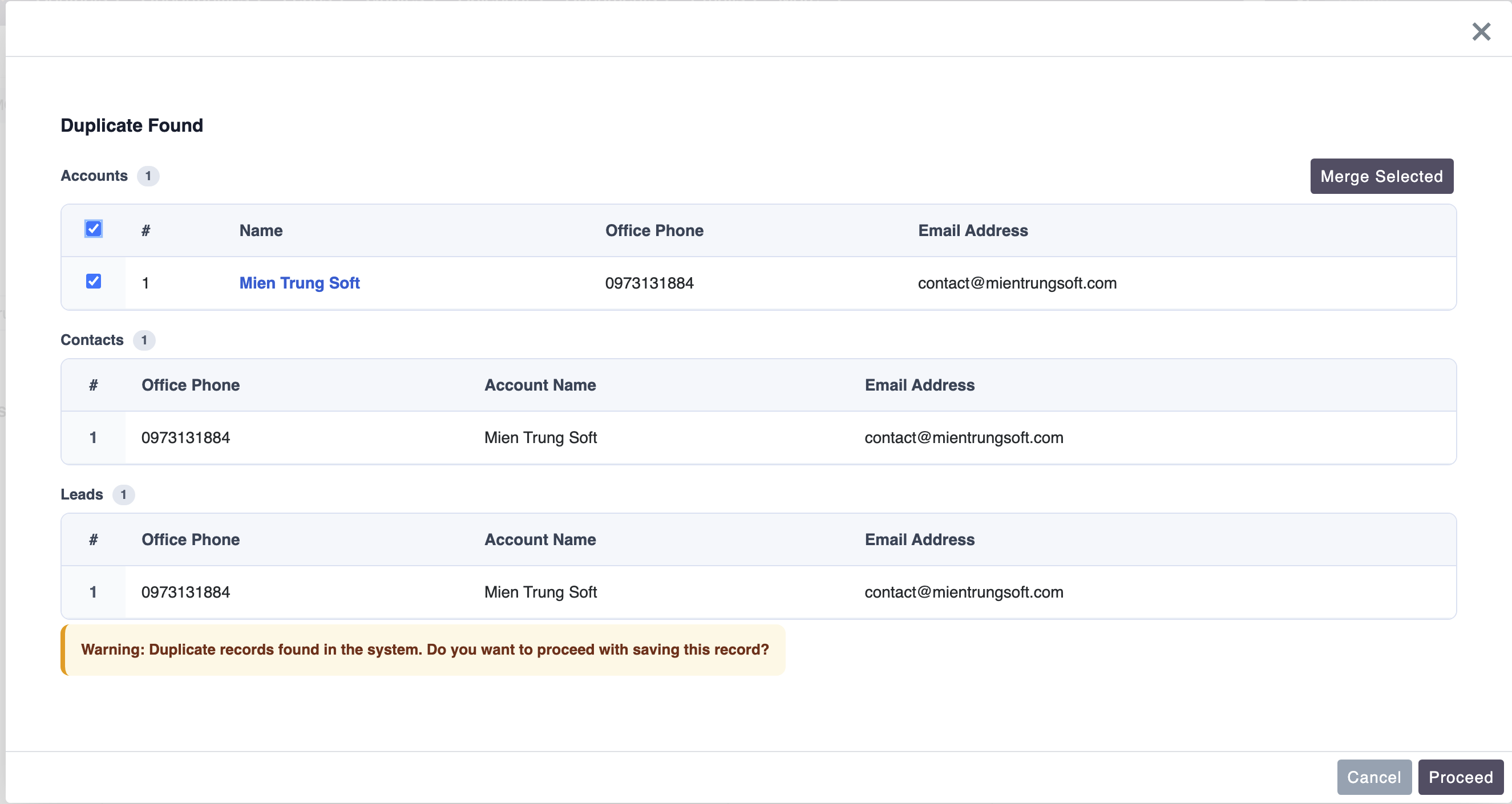 - When editing a record and duplicates are detected, each match now has a checkbox
- Select one or more and click Merge Selected to open SuiteCRM's native merge screen pre-loaded with those records — entirely within the app, no full page reload
- The Merge Selected button stays disabled until at least one record is selected
- When editing a record and duplicates are detected, each match now has a checkbox
- Select one or more and click Merge Selected to open SuiteCRM's native merge screen pre-loaded with those records — entirely within the app, no full page reload
- The Merge Selected button stays disabled until at least one record is selected
Support for Duplicated (Copied) Records - Using the Duplicate action and then saving now correctly offers the inline Merge, so you can fold the copy back into the original record instead of creating a duplicate
Improvements
- The duplicate warning popup is wider for easier side-by-side comparison
- Merge buttons now follow SuiteCRM 8's native button styling for a consistent look
- After a merge completes, the duplicate warning closes automatically and you are taken to the saved record
- German (
de_de) translations completed for all merge and duplicate messages, plus the configuration screen
What's New in Version 1.0.1
Cross-Module Duplicate Detection The plugin can now check for duplicates across multiple modules in a single pass. When saving an Account, for example, the system can simultaneously search for matching records in Contacts and Leads — without any extra configuration steps per check. Each module to include is set up independently in the admin panel with its own field mapping and display columns.
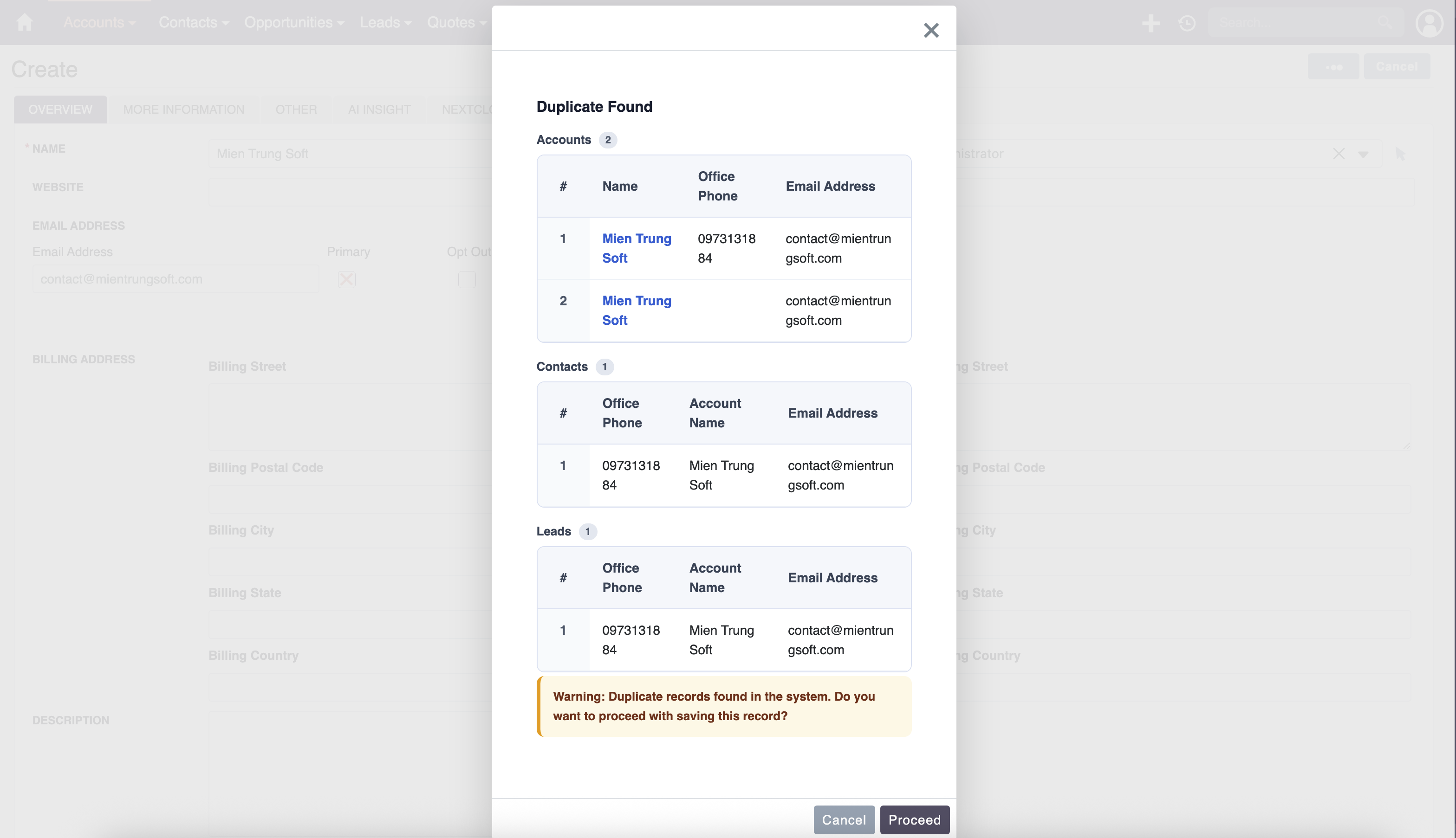
Results Organised by Module When duplicates are found across more than one module, the warning popup now groups results into separate sections — one per module — each with a clear heading and a count badge. Users can immediately see where the match was found and how many records are involved.
** Access Control Awareness** The plugin now respects SuiteCRM roles and security groups when displaying duplicate results. If a matched record exists but the current user does not have permission to view it, the popup shows a masked row with a lock indicator instead of hiding the result entirely. This ensures users are always informed that a duplicate exists, without exposing data they should not see. Administrators can choose between two checking modes: system-wide (all records, restricted ones shown as masked) or scoped (only records the user can already access).
Relate Field Display Relate fields such as Account Name on a Contact record now display correctly in the results popup.
Upgrading from 1.0.0 Install via Module Loader — your existing configurations are preserved. Run Quick Repair and Rebuild after installation.
Duplicate contacts, leads, and accounts are one of the most common data quality problems in SuiteCRM. MTS Duplicate Check solves this at the source — warning users the moment a potential duplicate is detected, right on the form, before the record ever enters your database.
Does Your SuiteCRM Have a Duplicate Records Problem?
- Your team creates the same contact or lead more than once because there is no warning when they start typing
- Accounts get split across two or three records with slightly different names, phone numbers, or email addresses
- You only discover duplicates during a data audit — weeks or months after they were created
- Merging records manually takes hours and risks losing important history or notes
- The built-in SuiteCRM duplicate check runs too late — only after clicking Save — and gives no detail about which record matched
If any of these sound familiar, MTS Duplicate Check is built for you.
How MTS Duplicate Check Stops Duplicates Before They Start
1. Duplicate Warning Before You Click Save
Your team sees the warning while they are still filling in the form — not after the record is already in the system.
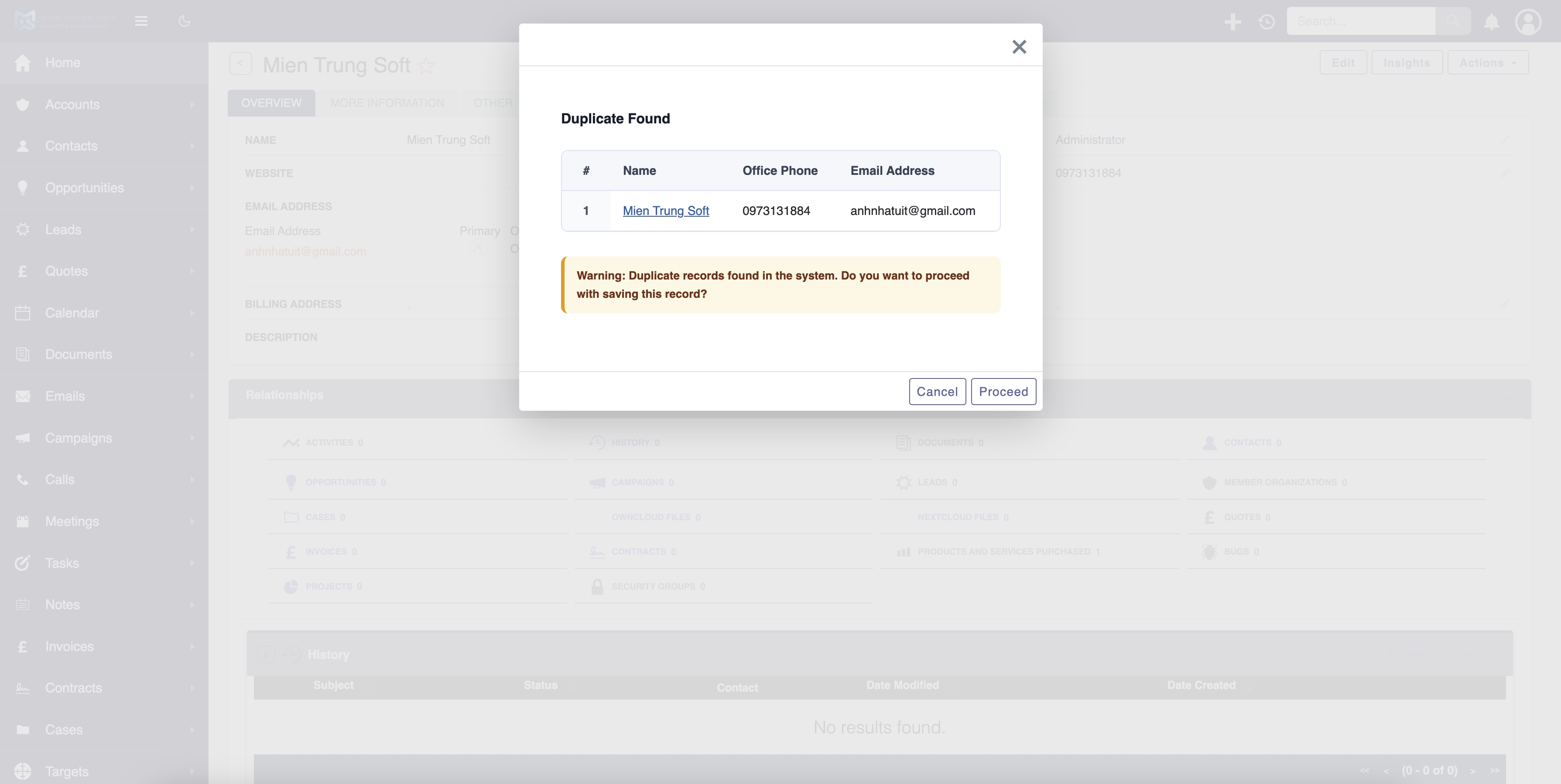
As soon as a user fills in the key fields on a Create or Edit form, the system quietly checks whether a matching record already exists. If a duplicate is found, a warning popup appears immediately. Users review the results and choose to proceed or go back — no page reload, no disruption to their workflow.
2. Set It Up Your Way, Per Module
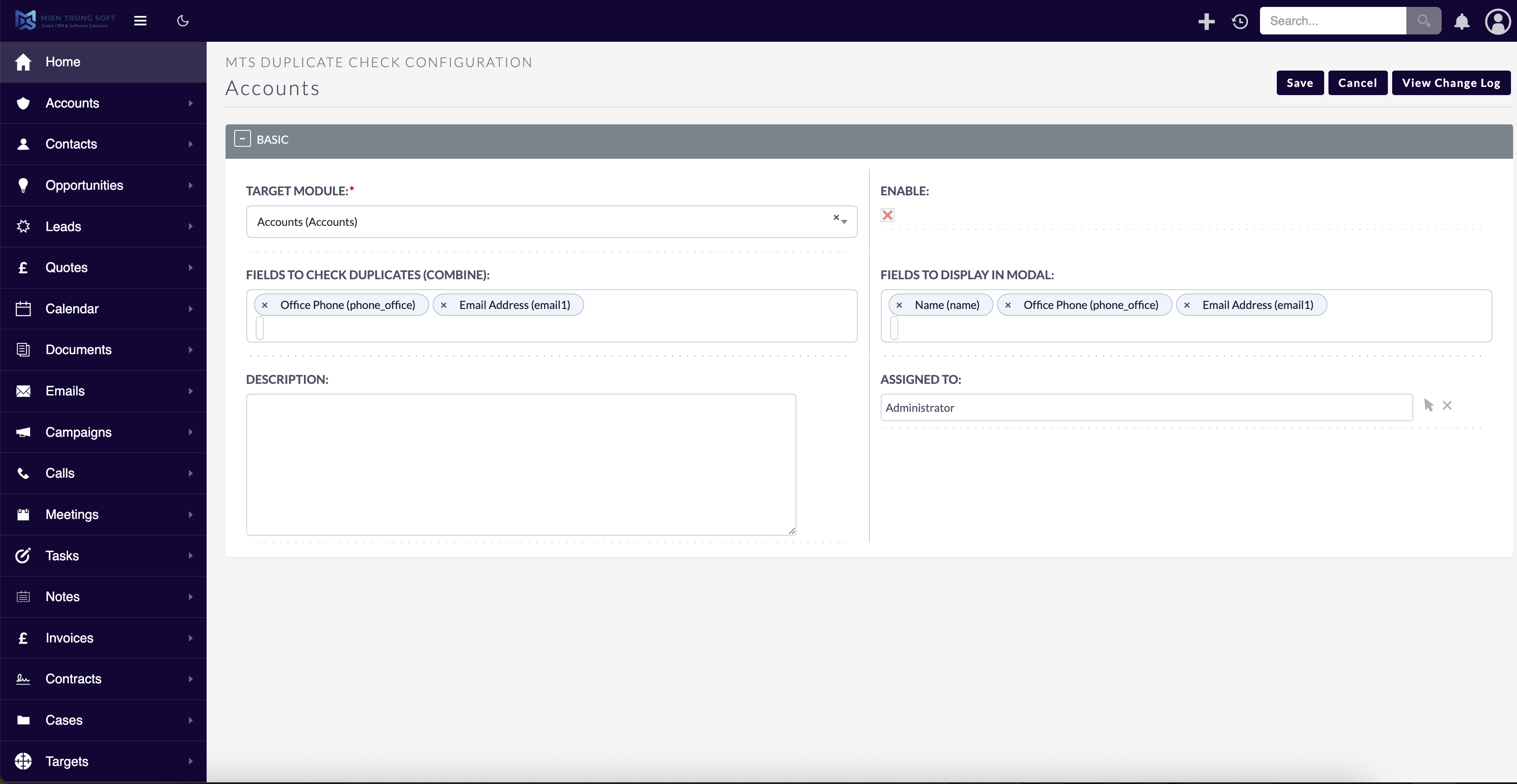
Configure which modules and which fields to check — no coding required.
Admins choose which modules to protect and which fields to use for duplicate matching. You can check Contacts by last name and phone number, Leads by email address, Accounts by company name — or any combination that makes sense for your business. Each module gets its own independent setup.
3. See the Matching Records Before Deciding
Users know exactly what they are duplicating — and can open the existing record in one click.
When a match is found, the popup shows a table of up to 5 existing records with the fields your admin selected — such as name, phone, and email. Record names are clickable and open in a new tab, so users can review the full record without losing the form they are filling in.
4. Works on Contacts, Leads, Accounts, and More
One plugin covers all the modules where duplicates do the most damage.
MTS Duplicate Check works on any standard SuiteCRM module — Contacts, Leads, Accounts, Prospects — and on custom modules you have built yourself. You can also check by email address, with automatic case-insensitive matching so variations like "info@company.com" and "Info@Company.com" are treated as the same.
5. Users Decide — The Plugin Never Blocks
A warning, not a wall. Your team stays in control.
After seeing the duplicates list, users choose: proceed with saving the new record (for example, when two people genuinely share a name) or go back to the form and update the existing one instead. The plugin informs — it never prevents.
Results: Before and After MTS Duplicate Check
| Without MTS Duplicate Check | With MTS Duplicate Check |
|---|---|
| Duplicates are created silently and pile up over time | Users are warned before the duplicate is saved |
| Teams only discover the problem during data audits | Issues are caught and resolved in the moment |
| Admins spend hours manually reviewing and merging | Clean data from day one — far less cleanup work |
| No visibility into which record already exists | Users see the existing record and make an informed choice |
| CRM reports are skewed by fragmented, duplicate data | Reliable data means reports you can trust |
"Within the first month, our duplicate lead rate dropped by more than 70%. The ability to see the existing record right there in the popup was what made the difference — our reps actually stopped and checked." — SuiteCRM Admin, manufacturing company
Why Teams Choose MTS Duplicate Check for SuiteCRM 8
- ✅ Works natively with SuiteCRM 8 — not a patch or workaround
- ✅ Warning appears before saving — earlier than any built-in SuiteCRM check
- ✅ Fully configurable from the admin panel — no code, no customisation needed
- ✅ Covers any module: Contacts, Leads, Accounts, Prospects, and custom modules
- ✅ Email duplicate detection with case-insensitive matching
- ✅ Custom fields from Studio are supported as check fields
- ✅ Up to 3 columns in the results table — show exactly the fields that help users identify a match
- ✅ Clickable record links in the popup — review the existing record without losing the form
- ✅ English and German languages included
- ✅ Warnings only — users are never hard-blocked from saving
Demo
Pricing
| Plan | Price |
|---|---|
| Yearly | View Price |
| One-Time / Enterprise | Contact us |
Get MTS Duplicate Check on the SuiteCRM Store →
Our SuiteCRM Plugins Now Support SuiteCRM 8
Productivity and Visualization
Developer and Admin Tools
Business and Finance
Automation and Integrations
AI and Collaboration
Utilities
- MTS Field Highlight
- MTS Language Translate Tool
- MTS User Activity Log
- MTS Timesheet
- SuiteCRM 8 Theme Editor
- Website: mientrungsoft.com
- Email: anhnhatuit@gmail.com
- WhatsApp: +84973131884
