

MTS Kanban brings a visual, drag-and-drop board into SuiteCRM so teams can manage stage-based work with less friction. Users can review records, move them across columns, and keep pipelines current from a single workspace instead of jumping between list views and record forms.
The addon is designed for practical day-to-day usage across sales, support, and custom workflows. SuiteCRM 8 includes the most complete experience, while SuiteCRM 7 remains supported for core Kanban usage.
Release Notes
MTS Kanban v1.3.1
Overview
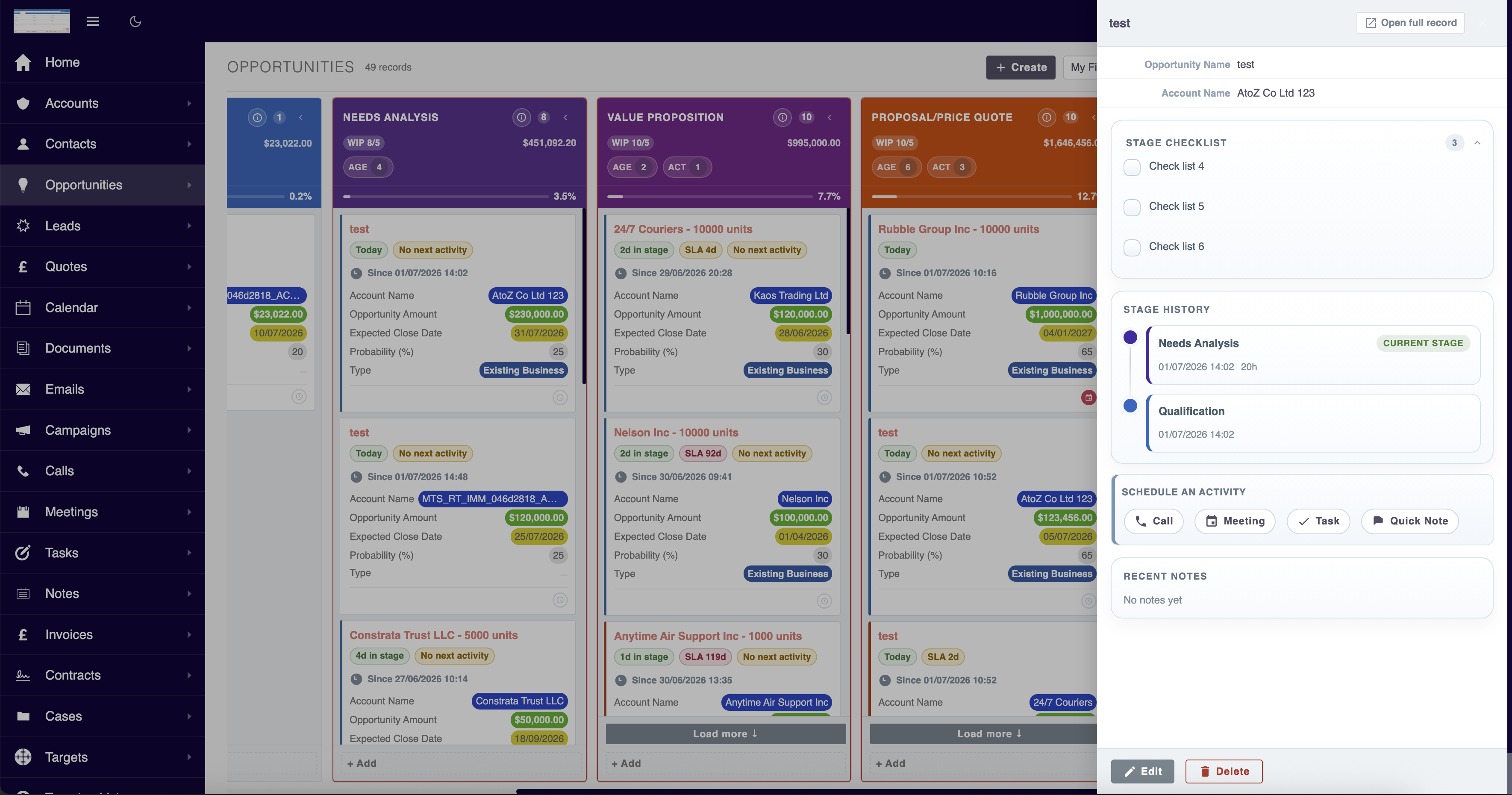
This release expands MTS Kanban from a visual board into a more action-driven CRM workspace. Users can now review stage context, complete more work directly from the board, and manage follow-up signals more effectively without jumping across multiple screens.
Full feature depth is optimized for SuiteCRM 8. SuiteCRM 7 continues to support the core Kanban experience and essential board operations.
If you need the full feature set and deeper SuiteCRM 8-style workflows, please contact us for tailored support.
Highlights
1. Stage History on Quick View
Users can now open a record and see its stage journey directly inside Quick View.
What's included:
- Current stage display
- Stage history timeline based on audit data
- Time-in-stage context directly tied to real stage changes
- Compact Since {date} indicator on cards when stage tracking data is available
Benefits: - Better visibility into pipeline movement - Easier review of stalled records - More reliable stage-age tracking for CRM teams
2. Stage Playbook / Checklist
Each displayed Kanban column can now have its own playbook or checklist.
What's included: - Per-column checklist configuration - Checklist shown inside Quick View - Checklist shown when creating a record into a stage - Checklist shown when moving a record into a stage
Benefits: - Standardizes team process by stage - Reduces missed steps during handoff or qualification - Helps enforce stage readiness without relying on memory
3. Quick Notes from Quick View
Users can now create notes directly inside Quick View without leaving the board.
What's included: - Inline Quick Note composer - Recent Notes section in Quick View - Faster CRM updates from a single screen
Benefits: - Capture context immediately while reviewing a card - Reduce context switching - Improve record hygiene and collaboration
Additional CRM Enhancements Included
Quick View Activity Timeline
Quick View now provides a cleaner activity timeline with: - Next Activity - Recent Activities - Better visual status cues for planned, due today, overdue, and completed activities
Inline CRM Actions
Users can trigger core CRM actions directly from Quick View: - Create Call - Create Meeting - Create Task - Add Quick Note
Stage Guidance
Stage-specific guidance can now be configured and displayed: - On the board header - In Quick Add - In move/transition flows
This helps users understand what is expected in each stage before they act.
Time in Stage / Aging
The board now supports stronger stage aging visibility: - Warning and overdue thresholds - Audit-aware stage timing - Better detection of records that remain too long in a stage
SLA / Response Time Signals
Optional SLA-style timing signals can now be configured: - Select a date/datetime field - Set warning and overdue thresholds - Show response-time pressure directly on cards
Follow-up Signals
The board can now highlight records with missing follow-up:
- No next activity badge on cards
- Attention indicator on column headers
This helps teams identify neglected records faster.
Configurable Stage Completion Rules
Closed-stage behavior is now more flexible: - Define which displayed columns are treated as closed - Configure the field used for stage date / closing date logic - Reduce hardcoded module-specific assumptions
UI / Usability Improvements
- More structured and cleaner config layout
- Better organized column behavior settings
- Improved header balance and attention-chip layout
- More compact and useful Quick View experience
- Better guidance presentation during create and move flows
What's New in v1.3.0
Version 1.3.0 focuses on turning the board into a true working surface for SuiteCRM 8 users. This release improves how quickly users can update records, create new records, and move work through controlled pipeline stages.
Inline Edit on Cards
Users can now edit key fields directly on Kanban cards.
Supported field types include:
- name
- text and numeric fields
- enum
- multienum
- date
- datetime
- relate
- assigned_user_name
- parent
Inline edit actions are shown on hover to keep card layouts clean.
Quick Add Inside Columns
Users can create a record directly inside the selected column using a compact inline form.
Highlights:
- Uses the card-visible fields as the quick add form
- Respects required fields and validation rules
- Keeps a Full Form fallback for complete record creation
- Preserves column context during create
Transition Rules for Stage Movement
Stage movement now supports configurable transition behavior:
- Warn to show a confirmation message
- Require Fields to collect required data before the move is saved
- Block to prevent invalid transitions
This makes the Kanban board suitable for governed workflows, not just visual tracking.
WIP Limits per Column
Admins can define Work In Progress limits for each column. Columns reaching or exceeding the threshold are visually highlighted to expose bottlenecks earlier.
Configurable Quick View Fields
The Quick View side panel now supports admin-configurable fields, making the panel more relevant for each module.
Reworked SuiteCRM 8 Config Page
The Kanban configuration screen has been reorganized to make setup easier: - Better grouping of board options - Improved layout for columns, colors, WIP limits, and transition rules - Collapsible panels for dense admin screens - Toggle-style activation controls - Reduced reliance on mixed legacy viewdef layout behavior
UX Improvements
- Inline edit controls now appear on hover instead of staying fixed on every field
- Date inputs normalize existing values correctly before editing
- Modal actions and labels were tightened for better space usage
- Transition modals were restyled to distinguish warning, required-fields, and blocked states
- Quick add form layout was compacted and improved for SuiteCRM 8 usage
Compatibility and Stability
- Hardened SuiteCRM 8 board routing and legacy entry compatibility
- Reduced risk of config save issues caused by malformed JSON state
- Improved language-key coverage to reduce hardcoded UI text
MTS Kanban v1.2.0 — Release Notes
New Features
Activities
- Redesigned activity indicator — each card now shows a single smart dot replacing the old badge count. Dot colour reflects the most urgent status across all activity types: red (overdue) › orange (due today) › green (planned). Dot icon matches the activity type (call / meeting / task).
- Activity popover — click the dot to open a popover listing all activities for that record, with dates displayed in your configured timezone and date format, assigned user, and a colour-coded status border.
- Mark Done — mark an activity as complete directly from the board. Add an optional note before confirming; the note is appended to the activity description and the column reloads automatically.
- Done & New — mark an activity done and immediately schedule a follow-up of the same type in one click.
- Edit activity — open the activity edit form in a modal without leaving the board.
- Schedule from card — every card shows a clock icon. On cards with no activities, clicking the clock opens a type picker (Call / Meeting / Task) and opens the create form with the parent record pre-filled.
- Create / edit modal — all activity and record forms open in a full-screen modal; the column reloads automatically after saving.
Quick View Panel
- Click any card body to open a 480px slide-in panel from the right.
- Displays all fields from the module's detail view definition (custom override respected), including relate fields, currency, dates, enums, HTML, files, images and links — all formatted to match SuiteCRM's native detail view (user timezone, date format, currency locale, translated enum labels).
- Panel footer includes Edit (opens modal) and Delete (inline confirmation) actions.
- Press Escape or click the backdrop to close.
Delete from Board
- Hover a card to reveal a delete button alongside the existing "Open record" action.
- Clicking delete shows an inline confirmation overlay directly on the card. Confirm to soft-delete the record (logic hooks and audit trail still fire); cancel or click outside to dismiss.
Column Header — Progress Bar
- A full-width progress bar is displayed at the bottom of each column header, showing the column's share of the total record count as a percentage.
- The bar updates correctly after drag-and-drop between columns.
Fold / Unfold Columns
- Collapse any column into a narrow vertical strip to keep your workspace tidy when working with many columns.
- The column label rotates 90° when folded; the record count remains visible.
- Click the folded header to restore. Fold state is persisted in
localStorageper module and restored automatically on your next visit.
Config Page — Improved Layout
- Settings are now organised into four clear sections: Board Setup, Card Fields, Appearance, and Advanced.
- Group By field and column picker (available / display dual-list) sit together in Board Setup; Column Header Colors are displayed alongside the column picker.
- Card Fields and Card Color Stripe are shown side by side.
- The Advanced section (Custom WHERE) is collapsible and auto-expands when a value is already set.
- A loading spinner appears while field options are being fetched after changing the target module.
Localisation Support
- All UI labels are now loaded from
mod_strings— no hardcoded English strings remain in the board or config page. - To add a translation, create a language file (e.g.
vi_VN.lang.php) inmodules/MTS_Kanban/language/with the same keys asen_us.lang.php.
Bug Fixes
- Column header colors and card color stripe not saving — fixed a PHP/JS type mismatch where empty color maps were serialised as JSON arrays (
[]) instead of objects ({}). String-keyed values set on a JS Array are silently dropped byJSON.stringify, causing all color selections to be lost on save. - Activity dates incorrect format — activity dates in the popover now follow the user's configured timezone and date format (previously used a hardcoded
M d, Yformat).
[1.1.0] — 2026-06-12
What's new in MTS Kanban 1.1.0
Create records faster You can now add a new record directly from any column — just hover over a column header and click + Create. The new record is automatically placed in that column, saving you a step.
Switch between List and Kanban in one click A Kanban button now appears on every module's list view toolbar, so you can jump to the Kanban board without navigating away.
Filters now work reliably Selecting a saved filter from the My Filters dropdown now correctly loads all your filter criteria — this fixes a bug where previously saved filters appeared empty when re-opened.
Kanban remembers your last filter When you return to the Kanban board, it automatically applies the filter you had selected last time. No need to re-select it on every visit.
Cleaner filter panel The filter panel now has a proper close button and a smoother open/close animation. Selecting a filter from the dropdown closes the panel automatically so it stays out of your way.
Open records with one click Hover over any card to reveal a quick-open button — click it to open the full record without leaving the board.
Save filters using SuiteCRM's built-in feature Filter saving is now handled by SuiteCRM's native save filter button inside the filter panel, consistent with how other modules work.
Bug fixes - Fixed a page error that appeared when opening certain module configuration screens. - Fixed the create record window being hidden behind other page elements.
Version 1.0.0
Initial Release
- Multi-module support
- Drag & Drop stage updates
- Configurable group field
- Real-time record count
- Real-time amount aggregation
- Admin configuration panel
- Responsive UI
 Saving Comment...
