

MTS Duplicate Check is a SuiteCRM 8 plugin that warns users about duplicate records in real time — before anything is saved. When a match is found, a popup shows the existing records so users can decide whether to proceed or update the one already in the system.
Release Notes
MTS Duplicate Check — Release Notes
Version 1.1.0 (2026-09-12)
New Features
Multiple Duplicate-Check Rules per Module - Each module can now have more than one duplicate-check rule (previously limited to one). For example, on Leads you can keep one rule that matches by name and another that matches by email or phone — each with its own settings. - Every rule keeps its own check fields, display fields, security mode, and cross-module configuration.
Rule Priority - New Priority field on each rule — a lower number means higher priority (default is 1). - Rules are evaluated in priority order and the first rule that finds a match wins: its results are shown and the check stops there. Ties fall back to the rule's creation date. - This keeps the warning focused on the most relevant rule instead of mixing unrelated matches together.
Priority in the Admin Panel - Priority is shown and editable on the rule Create/Edit form, the detail view, and the rules list view, so you can see and adjust evaluation order at a glance.
Behaviour Notes
- First match wins, results are not combined across rules. With multiple rules on one module, only the highest-priority matching rule's results appear; lower-priority rules are not evaluated once a match is found. To check several independent criteria in a single popup, put them in one rule — check fields are combined with AND, and cross-module checks are combined within that rule.
- Cross-module still runs even if the target module has no match. Within the winning rule, the target module and every configured cross-module are checked independently; a match in any of them triggers the warning.
- Automatic validator sync. Enabling, disabling, or deleting rules now re-syncs the module's duplicate-check trigger automatically. When the last active rule for a module is removed, its trigger is cleaned up so no stale configuration is left behind.
Bug Fixes
- Fixed leftover (orphaned) validator configuration when the last rule for a module was deleted.
Upgrade Notes
- After installing 1.1.0, run Admin → Repair → Quick Repair and Rebuild — this adds the new Priority column and refreshes the duplicate-check validators.
- When you configure the first rule for a module that never had one before, run Quick Repair and Rebuild and reload the browser so the new duplicate check is picked up. Modules that already had a rule pick up changes immediately.
Version 1.0.3 (2026-06-17)
Improvements
Clearer Merge Error Reporting - When the Merge action cannot reach the server, the popup now explains what happened instead of showing a generic "Merge failed" message - If the login session has expired, the popup now tells you to reload the page and sign in again, then retry - For any other unexpected response, the technical details are written to the browser console so the issue can be diagnosed quickly from a single screenshot
Version 1.0.2 (2026-06-15)
New Features
One-Click Merge from the Duplicate Warning
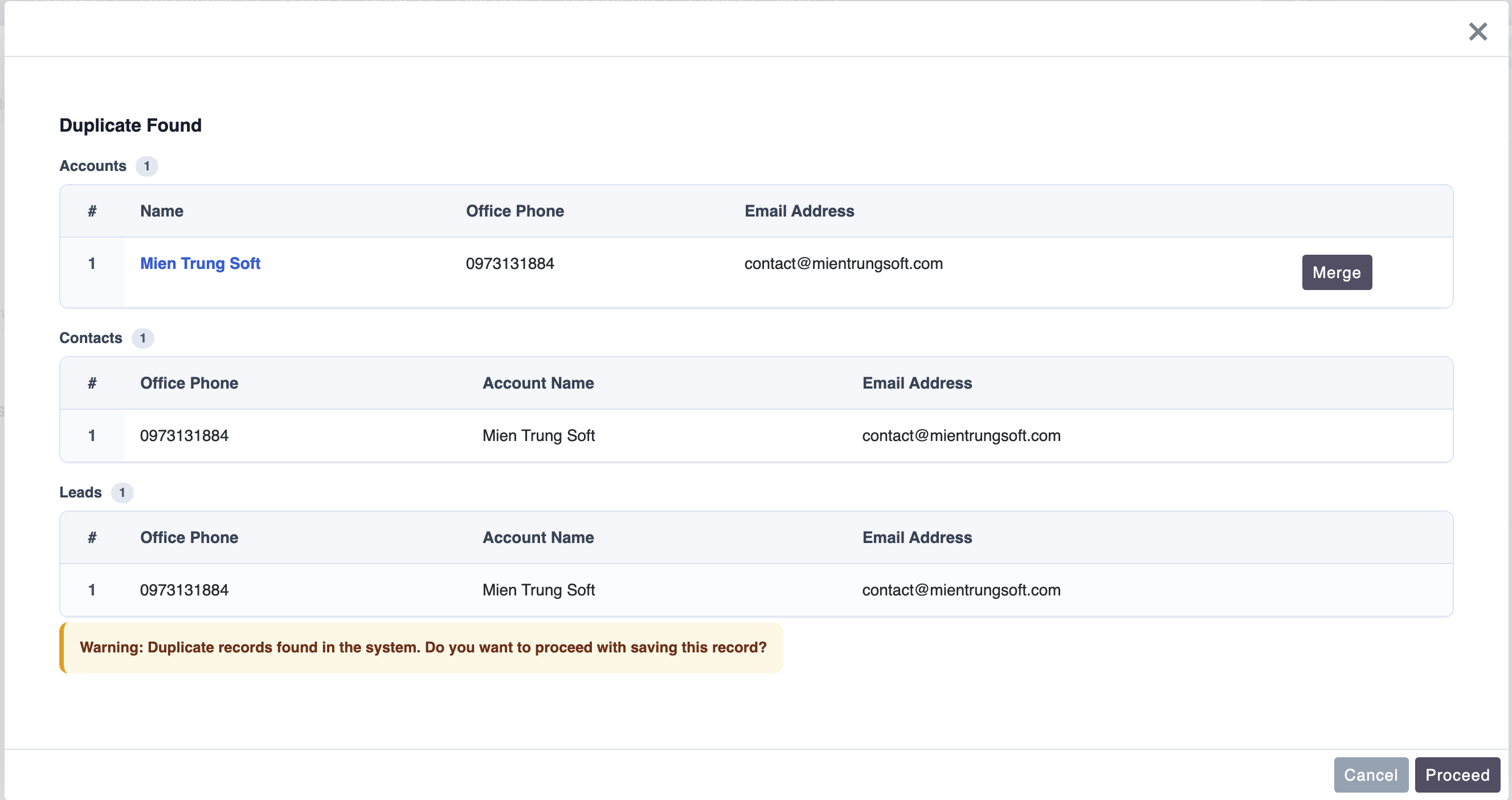
 - When the duplicate warning appears while creating a record, each matching record now has a Merge button
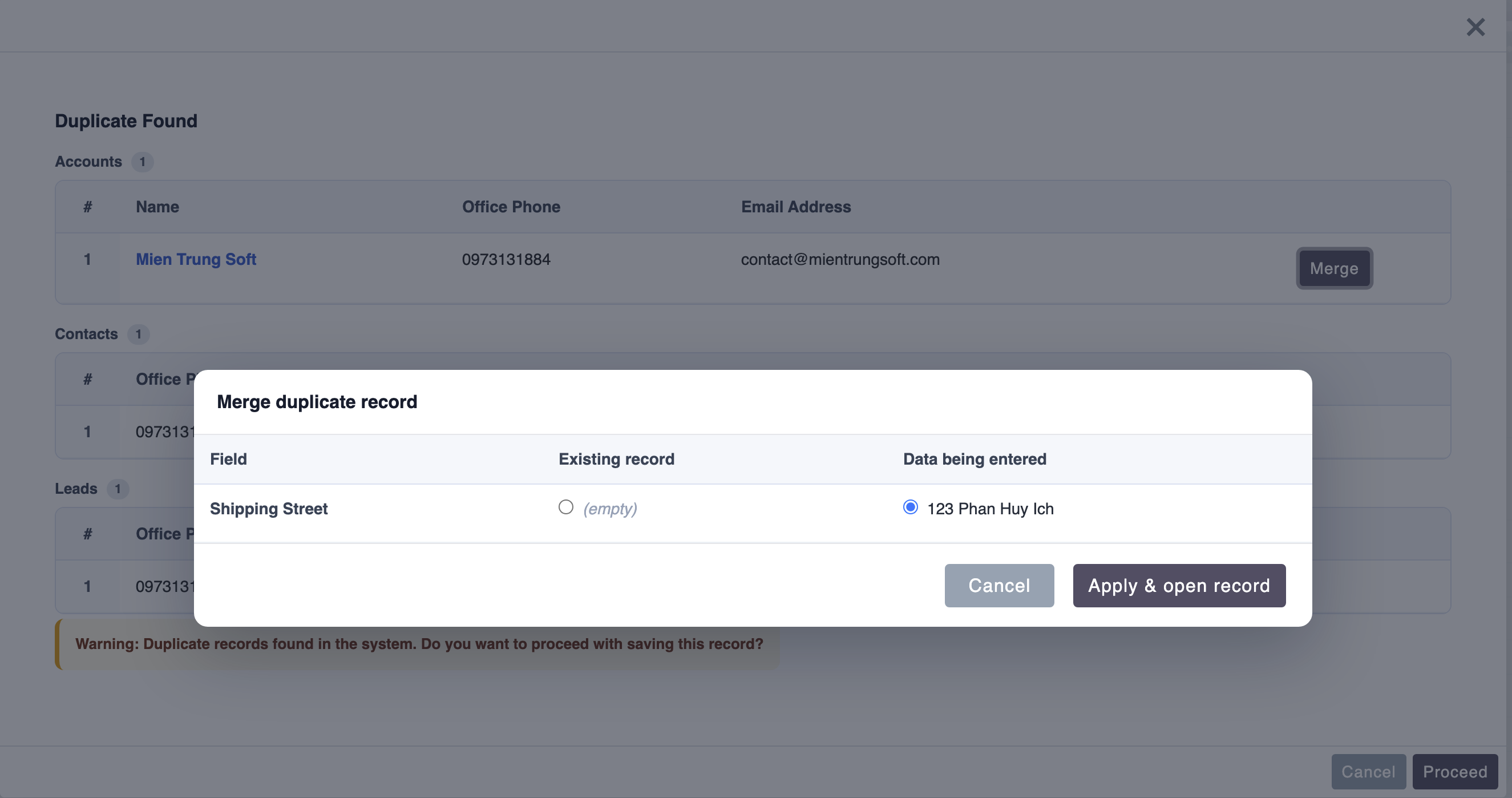
- Clicking Merge opens a side-by-side comparison of the existing record against the data you just entered, with a per-field choice of which value to keep
- Confirming writes the chosen values into the existing record and opens it — no duplicate record is created
- When the duplicate warning appears while creating a record, each matching record now has a Merge button
- Clicking Merge opens a side-by-side comparison of the existing record against the data you just entered, with a per-field choice of which value to keep
- Confirming writes the chosen values into the existing record and opens it — no duplicate record is created
Merge While Editing
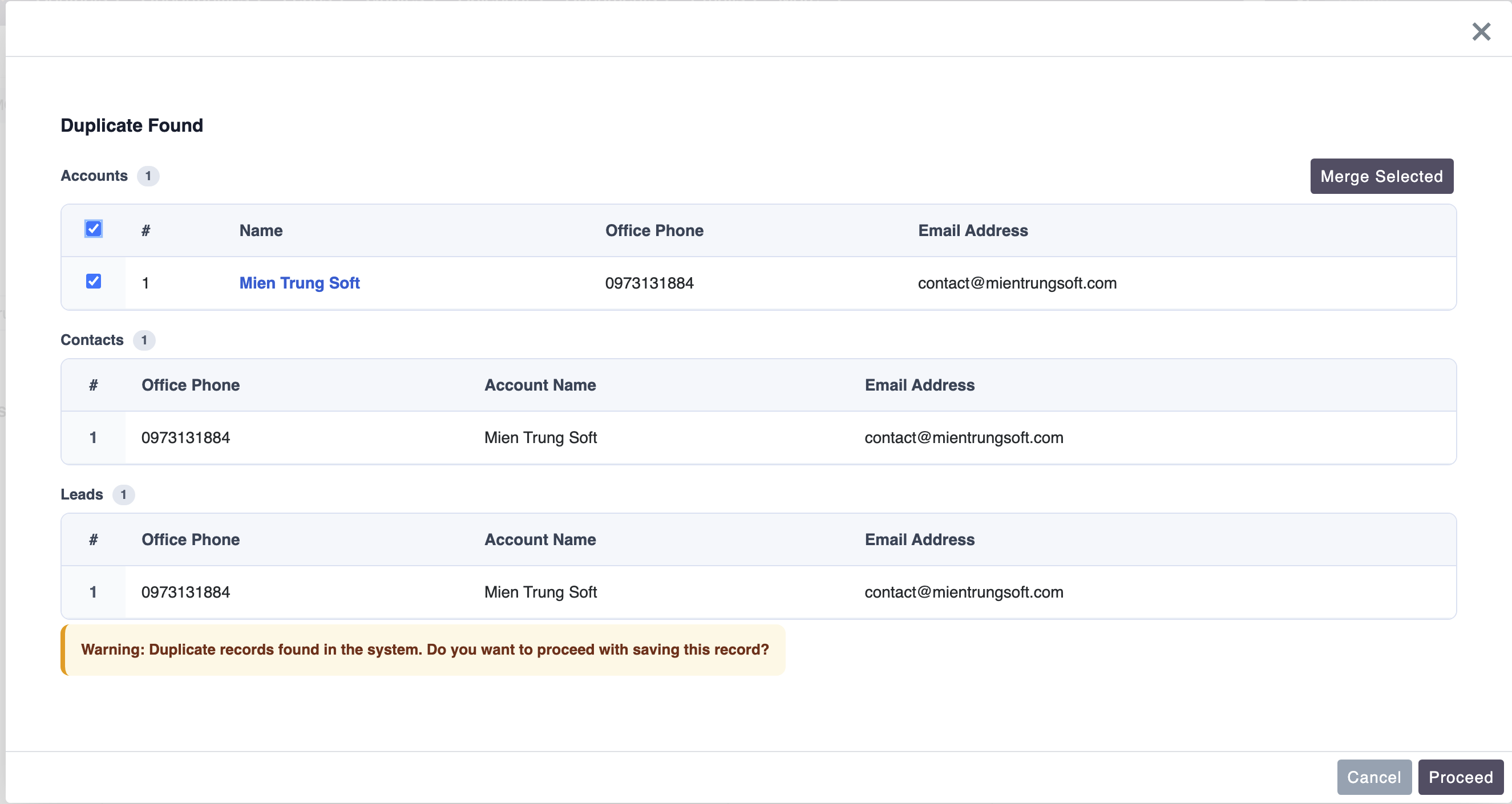 - When editing a record and duplicates are detected, each match now has a checkbox
- Select one or more and click Merge Selected to open SuiteCRM's native merge screen pre-loaded with those records — entirely within the app, no full page reload
- The Merge Selected button stays disabled until at least one record is selected
- When editing a record and duplicates are detected, each match now has a checkbox
- Select one or more and click Merge Selected to open SuiteCRM's native merge screen pre-loaded with those records — entirely within the app, no full page reload
- The Merge Selected button stays disabled until at least one record is selected
Support for Duplicated (Copied) Records - Using the Duplicate action and then saving now correctly offers the inline Merge, so you can fold the copy back into the original record instead of creating a duplicate
Improvements
- The duplicate warning popup is wider for easier side-by-side comparison
- Merge buttons now follow SuiteCRM 8's native button styling for a consistent look
- After a merge completes, the duplicate warning closes automatically and you are taken to the saved record
- German (
de_de) translations completed for all merge and duplicate messages, plus the configuration screen
Version 1.0.1 (2026-06-10)
New Features
Cross-Module Duplicate Detection - The plugin can now check for duplicates across multiple modules at once — for example, when creating an Account, it can simultaneously detect matching records in Contacts and Leads - Each module to check is configured separately in the admin panel, with its own field mapping and display fields - Results from all modules are returned in a single popup — no extra clicks, no extra forms
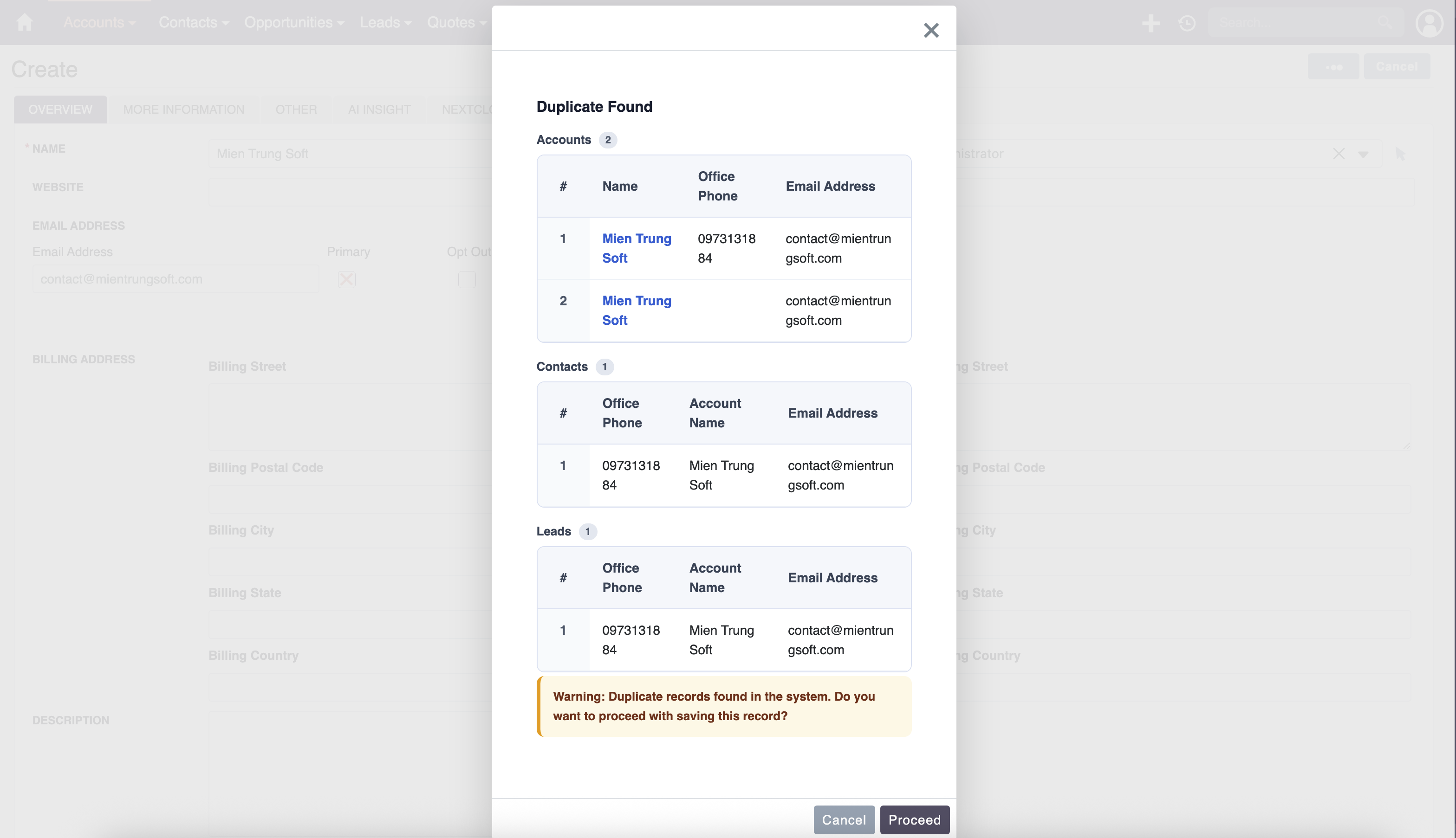
Module-Grouped Results Popup - When duplicates are found across multiple modules, the popup now groups results by module - Each module section has a clear heading with the module name and a count badge showing how many matches were found - Display fields are independently configured per module so the most relevant columns are shown for each record type
Access-Restricted Record Handling - In Global security mode, if a matched record exists but the current user does not have permission to view it, the popup now shows a masked row instead of hiding the result entirely - The masked row displays a lock icon and "Access restricted" so the user knows a duplicate exists without revealing any protected data - Records the user can access continue to show full detail as before
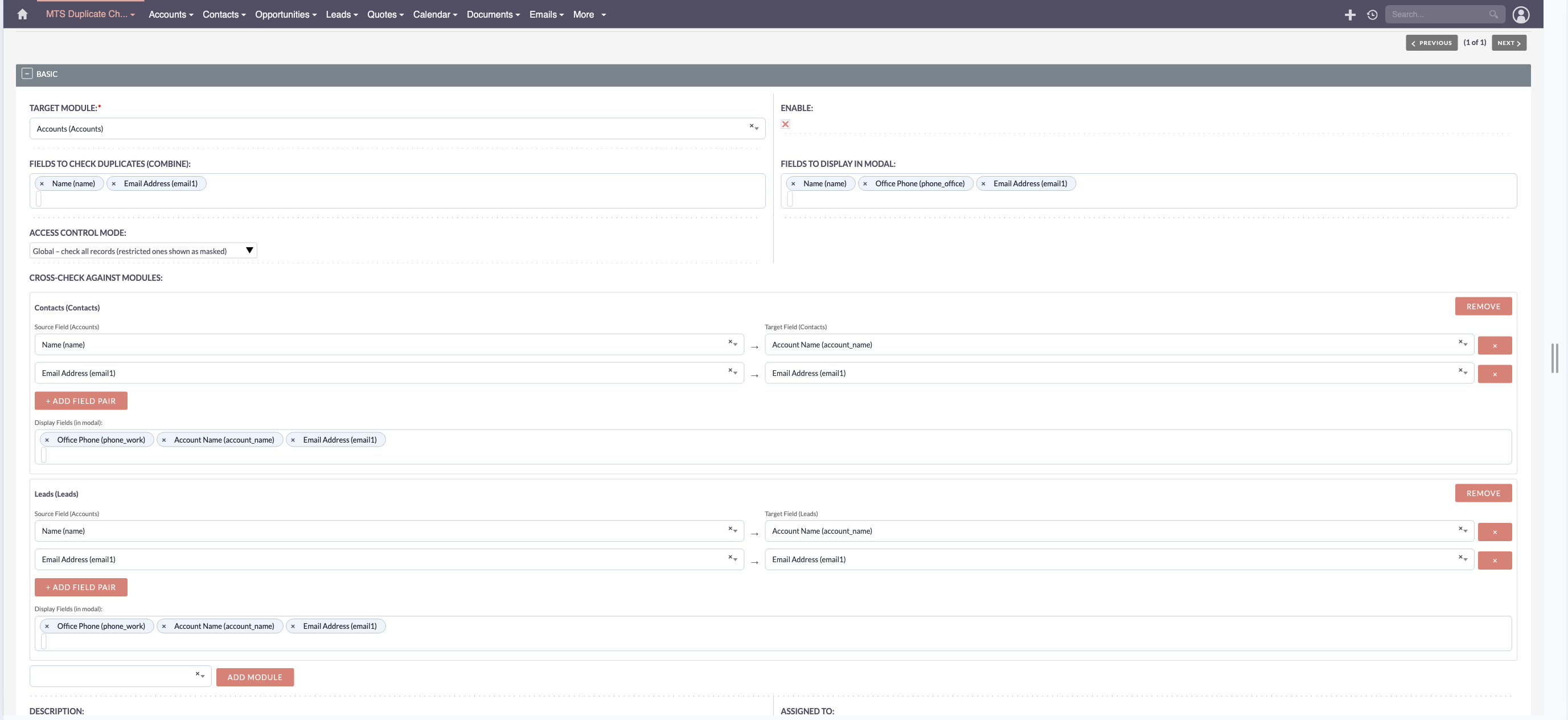
Relate Field Display - Relate fields such as Account Name on a Contact record now display correctly in the results popup - The plugin loads each matched record through the standard SuiteCRM bean to ensure all related fields are populated automatically
Improvements
Security Mode Labels - The Security Mode dropdown in the admin panel now includes a plain-language description for each option so it is easier to choose the right setting without consulting the documentation - Global — checks all records in the system; records the user cannot access are shown as masked - Scoped — only checks records the current user has permission to view
Wider Results Popup - The duplicate warning popup is now slightly wider to better accommodate tables with multiple columns
User Context in API Requests - The duplicate check now correctly identifies the current user when triggered through the SuiteCRM 8 API, ensuring that security mode filtering and access checks reflect the actual logged-in user
Bug Fixes
- Fixed an issue where the cross-module check failed with a database error when a relate field used a junction table instead of a direct foreign key column (for example, the Contacts–Accounts relationship)
- Fixed an issue where relate fields used as check criteria incorrectly placed the display value into the foreign key column in the SQL query
- Fixed an issue where records the current user is editing were incorrectly excluded from cross-module checks
--
Version 1.0.0 (2026-05-14)
Initial Release
New Features
Real-Time Duplicate Detection - Duplicate check runs automatically as users fill in the form — no need to click Save first - Works on Create and Edit forms across any configured module - When editing an existing record, the system excludes that record from the results so it never flags itself - Shows up to 5 matching records per check
Admin Configuration - Admins can set up duplicate checking for any module from a dedicated admin panel - Choose which fields to use for matching and which fields to show in the results popup - Up to 3 display fields can be selected to help users identify the matched record at a glance - Each module has its own independent configuration - Enable or disable checking per module without losing your settings
Duplicate Results Popup - When a duplicate is found, a clear warning popup appears before the record is saved - Results are shown in a clean table with a row for each matching record - Record names appear as clickable links — users can open the existing record in a new tab to review it - The popup shows the total number of matches found - Users choose to proceed with saving or go back to the form
Email Address Matching - Email fields can be selected as a check field - Matching is case-insensitive, so "Info@Company.com" and "info@company.com" are treated the same
Custom Field Support - Custom fields added via Studio or Module Builder can be used as check fields or display fields
Multi-Language Support - English and German language packs included - All popup messages and admin labels are fully translated
Security - All user-entered values are safely handled before any comparison is made - Only administrators can access the configuration panel - License is verified before any duplicate check runs — the plugin is inactive without a valid license
License - Activated via the SuiteCRM Store - License is validated weekly in the background — no interruption to normal use
Known Limitations
- One configuration per module — if you need different rules for the same module, update the existing configuration
- The field that triggers the duplicate check is selected automatically; manual selection is not available in this version
- Email address cannot be the trigger field — another field in your configuration is used for that
- Up to 5 duplicate records are shown in the popup; additional matches beyond 5 are not displayed
- If any configured check field is left blank on the form, the duplicate check is skipped for that submission
- Bulk import or export of configurations is not available in this version
Upcoming Features (Roadmap)
Version 1.1.0
- [ ] Choose which field triggers the duplicate check yourself, instead of relying on automatic selection
- [ ] Set how many results to show in the popup (currently fixed at 5)
- [ ] Check for duplicates across multiple modules at once
- [ ] Highlight which fields caused the match in the results table
Version 1.2.0
- [ ] Import and export configurations in bulk via CSV
- [ ] Scheduled duplicate summary reports sent by email (daily or weekly)
- [ ] Allow specific user roles to skip the duplicate warning without confirmation
- [ ] One-click merge: open and merge a matched record directly from the popup
Upgrade Notes
Activating a License After Purchase
- Purchase a license from the SuiteCRM Store
- Go to Admin → MTS Duplicate Check → License
- Enter your license key and click Validate
- No reinstall is needed
Reinstalling (Same or Newer Version)
- Go to Admin → Module Loader → Installed Packages
- Uninstall the current version — choose Leave Tables to keep your existing configurations
- Upload and install the new package
- Go to Admin → MTS Duplicate Check → License and validate your license again
- Go to Admin → Repair → Quick Repair and Rebuild
- Open a configured module's Create form and verify the duplicate warning appears as expected
Version History
| Version | Date | Notes |
|---|---|---|
| 1.0.0 | 2026-05-14 | Initial release |
For support or to report issues:
- Website: mientrungsoft.com
- Email: anhnhatuit@gmail.com
- WhatsApp: +84973131884
 Saving Comment...
