
Email open tracking for SuiteCRM 8: see when recipients open your emails, with read badges, open counts and instant in-app alerts.
MTS Email Read Receipt is an email open tracking plugin for SuiteCRM 8. It records when a recipient opens an HTML email sent from SuiteCRM, shows a Read / Not Read badge on the email, and sends you an in-app notification on the first open.
You send an email from SuiteCRM and then you wait. Did the contact open it? Did they ignore it? Is it the right time to call? MTS Email Read Receipt answers those questions instantly. The moment a recipient opens your email, SuiteCRM shows a read status badge on the message and delivers an in-app notification to you — so every follow-up is perfectly timed.
Does Your SuiteCRM Team Have an Email Visibility Problem?
- Your sales rep sends a quote and calls the prospect the next morning — but the email hasn't been opened yet, and the call feels premature and annoying
- You send a support email and wait two days before following up, not knowing the contact read it within the hour
- Your team has no way to tell which sent emails were actually received and opened — and which ones went straight to the bin
- Managers reviewing email activity cannot distinguish between emails that landed and were read versus emails that were simply never opened
- Your follow-up sequences are timed by guesswork rather than by the contact's actual behaviour
- You close deals slower because you cannot prioritise warm, engaged contacts over cold, unresponsive ones
How MTS Email Read Receipt Solves It
1. Know the Exact Moment Your Email Is Read
Stop guessing — see a live read status directly on every sent email.
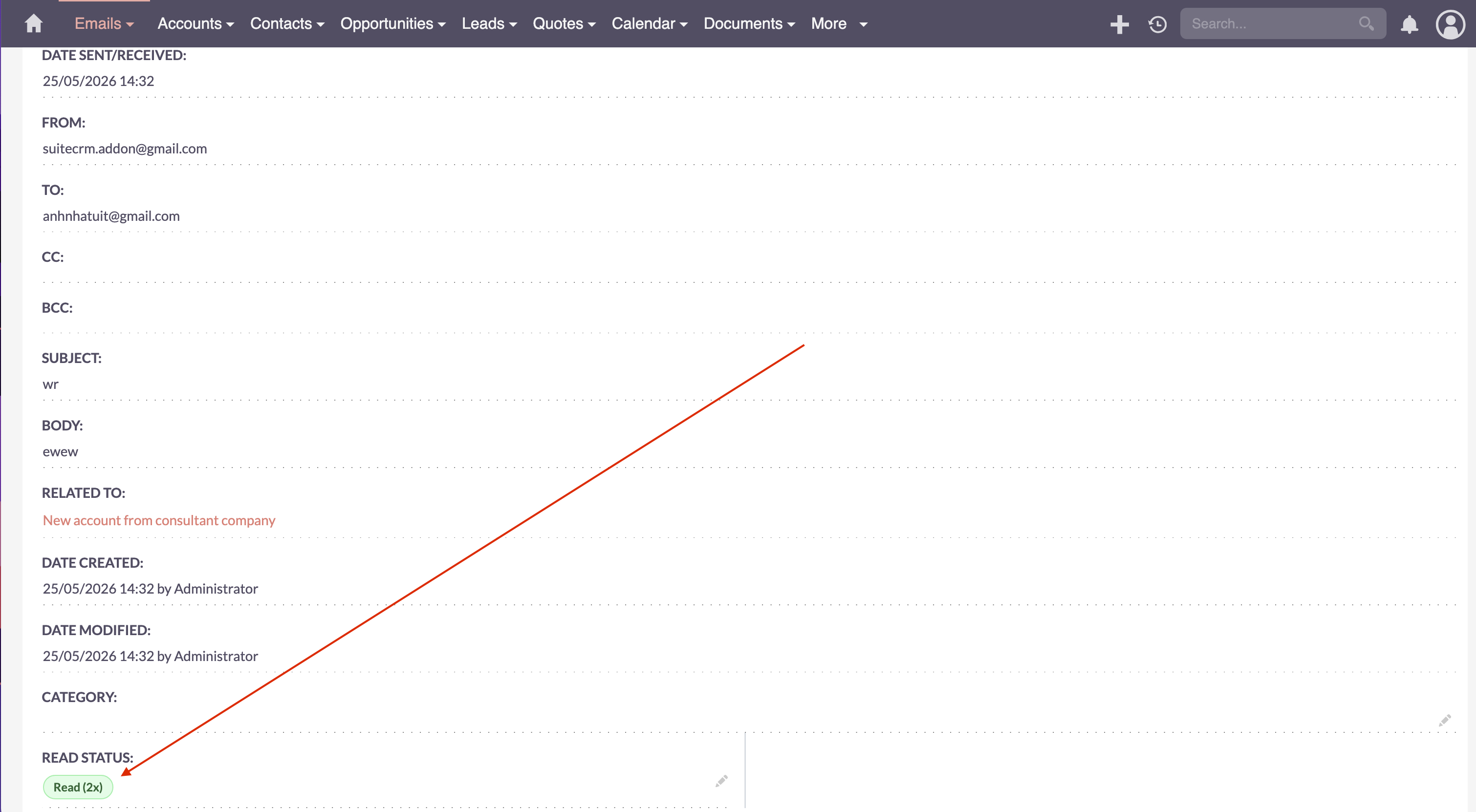
When you send an HTML email from SuiteCRM, a tiny invisible marker is embedded automatically. The instant a recipient opens the message, SuiteCRM records the event. A green "Read" badge appears on the email record, showing how many times the email was opened. A yellow "Not Read" badge shows when the email has been delivered but not yet opened.
2. Get an Instant In-App Alert When It Matters
Act while your email is top of mind for your contact.
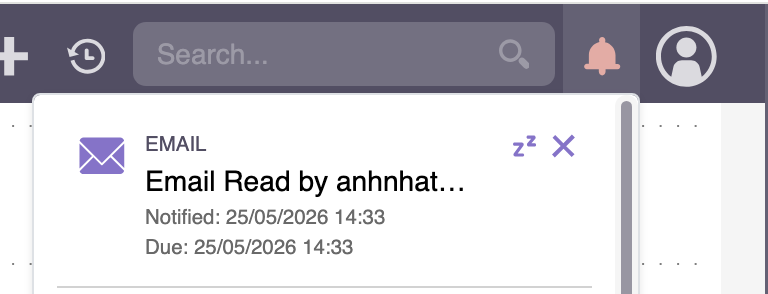
The moment a contact opens your email for the first time, SuiteCRM sends you an in-app notification. The alert shows the recipient's name, the email subject, and the exact time the email was opened. You can click straight through to the email record or reach out while your message is fresh.
3. Track Every Sent Email in One Place
A complete record of who opened what and when — no spreadsheet required.
Every outgoing email creates a tracking record in the MTS Email Receipt module. From there you can see the date the email was sent, the date it was first opened, the total number of times it was opened, and the last location details for the opener. You can filter and search records just like any other SuiteCRM module.
4. Admin Controls That Keep Your Team in Charge
Enable, disable, or adjust tracking in seconds — no technical help needed.
The configuration page lets an admin turn open tracking on or off for the entire system. You can also separately control whether in-app notifications are sent when emails are opened. Both settings take effect immediately.
5. Clean Data, No False Positives
Only real human opens are counted.
MTS Email Read Receipt automatically ignores automated link scanners, search engine crawlers, and email preview tools. Only genuine human opens are recorded, keeping your tracking data accurate and your follow-up decisions reliable.
Results: Before and After MTS Email Read Receipt
| Scenario | Before | After |
|---|---|---|
| Sending a quote | Call the next day hoping the email was read | See the badge turn green and call while they are engaged |
| Support follow-up | Wait 48 hours before checking in | Alert fires on first open — follow up with confidence |
| Reviewing email activity | No visibility into which emails were actually seen | Every email shows Read or Not Read with open count |
| Prioritising warm leads | All sent emails look the same on the list | Opened emails stand out — focus energy where it counts |
| Timing a second email | Send a reminder blindly after a fixed number of days | Send the reminder when you know the first email was not read |
"We used to call prospects the day after sending a proposal without knowing if they had seen it. Now we wait for the green badge and call while the proposal is fresh. Our conversion rate on those calls has gone up noticeably." — Sales Manager, IT Distribution Company
Why Teams Choose MTS Email Read Receipt
- Works inside SuiteCRM — no external tools, no browser extensions, no extra logins
- Read status badge appears directly on the email record — zero extra clicks to check
- In-app notifications mean you act at the right moment, not days later
- Full open history per email: first open date, open count, and last opener details
- Bot and preview filter ensures your numbers reflect real human engagement
- Admin toggle gives full control without needing a developer
- Compatible with SuiteCRM 8 and the SuiteCRM Store — installed in minutes
FAQ
How does email open tracking work in SuiteCRM?
A tiny invisible marker is embedded in HTML emails sent from SuiteCRM. When the recipient opens the email, the open is recorded and the email shows a Read badge with the open count.
Will I be notified when an email is opened?
Yes. On the first open you get an in-app notification with the recipient, subject and time. Admins can turn notifications on or off.
Are bot opens counted?
No. Link scanners, search engine crawlers and email preview tools are ignored, so only real human opens are recorded.
Where can I see tracking history?
Each sent email has a record in the MTS Email Receipt module showing sent date, first open date, total opens and last opener details, searchable like any SuiteCRM module.
Which SuiteCRM version is supported?
SuiteCRM 8.
Pricing
| Plan | Details |
|---|---|
| Yearly Subscription | View Price |
| One-Time / Enterprise | Contact us |
Get MTS Email Read Receipt on the SuiteCRM Store →
Our SuiteCRM Plugins Now Support SuiteCRM 8
Productivity and Visualization
Developer and Admin Tools
Business and Finance
Automation and Integrations
AI and Collaboration
Utilities
- MTS Field Highlight
- MTS Language Translate Tool
- MTS User Activity Log
- MTS Timesheet
- SuiteCRM 8 Theme Editor
- Website: mientrungsoft.com
- Email: anhnhatuit@gmail.com
- WhatsApp: +84973131884