


MTS Mail Pro is a full email client for SuiteCRM 7 and 8: a Gmail-style inbox, IMAP folders, rich compose, and one-click import of emails into Accounts, Contacts, Leads, Cases and Opportunities.
Your sales and support teams live in two places — their inbox and their CRM. Every switch between them loses context, leaves records unlogged, and lets deals slip. MTS Mail Pro closes that gap. Read, send, import and convert email without ever leaving SuiteCRM.
Release Notes
MTS Email Client — Release Notes
Version 1.3.1 — 2026-09-04
A major productivity release focused on turning email into CRM work — convert messages into records, keep the right people linked, and compose with the same rich editor everywhere.
Convert an email into a CRM record
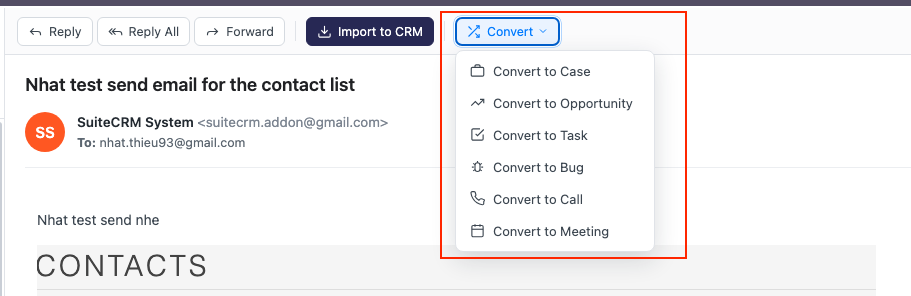
- Turn any email into a Case, Opportunity, Task, Bug, Call, or Meeting without leaving the inbox — use the new Convert menu on the message toolbar.
- A form opens pre-filled with the email's subject (as the record name) and body (as the description). Add the essentials inline — for example Amount and Expected close date for an Opportunity, or a Due date for a Task.
- The source email is imported and linked to the new record automatically, so it appears in that record's History.
- After converting, you're taken straight to the new record to fill in any further details.
Create & relate contacts while converting
- The convert form reads the email's From / To / Cc addresses and shows which are already CRM contacts and which are new.
- Choose who to relate to the new record — existing contacts are linked and new ones are created on the spot — so your Case / Opportunity / Task is connected to the right people immediately.
Compose from anywhere with the inbox editor (SuiteCRM 8)
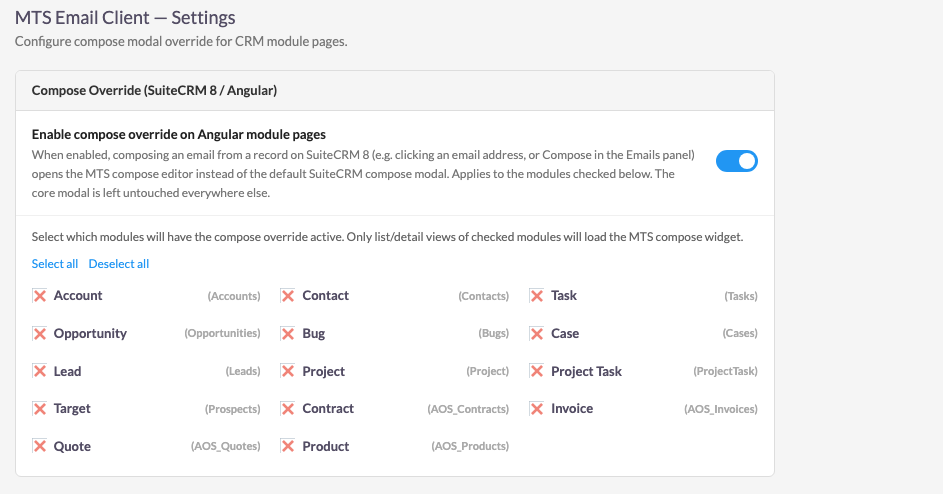
- Optionally use the MTS compose editor — the same one you use in the inbox — when writing an email from any record (Contact, Account, Case, Opportunity, Task, and more), for a consistent experience across the CRM.
- Enable it in Admin → MTS Email Client → Compose Override (SuiteCRM 8) and choose which modules it applies to. It is off by default, and the standard SuiteCRM compose window is left completely untouched when disabled.
Instant message opening
- The current inbox page is prefetched in the background, so opening a message is instant — no per-click wait for the server. If a message isn't cached yet, it simply loads on demand as before.
Refreshed dialog design
- The compose, convert, link / import and quick-create dialogs now match the SuiteCRM 8 look & feel (colours, buttons and headers) for a cleaner, more native experience.
Version 1.1.1 — 2026-07-05
Fixed
- Opening an email failed on SuiteCRM 8.10+. The core
getMessageTextWithUid()method signature changed in SuiteCRM 8.10 (the$structureparameter was replaced), which caused a type error while sanitizing the message body and prevented emails from opening. The module now detects the correct signature and works on both SuiteCRM 8.10+ and earlier versions.
Version 1.1.0 — 2026-07-05
A major performance and reliability release. This version consolidates all improvements made since 1.0.0 into a single stable release. Highlights below.
Instant inbox (local header index)
- Browsing — opening a mailbox, paging, switching tabs (All / Unread / Starred) and searching — is now served from a fast local index in milliseconds instead of connecting to IMAP on every action. Message bodies are never stored; they are fetched from the server only when a message is opened.
- Background sync scheduler ("MTS Email Client — Sync Inbox Index", every 10 minutes) keeps the index fresh so even the first open of the day is instant. The index progressively backfills until it mirrors the whole mailbox.
- No missing email: deep pages, tab views and searches on a not-yet-fully-indexed mailbox fall back to live IMAP so every message is reachable, and pagination reflects the real mailbox size. If the index is ever unavailable, the inbox falls back to live IMAP.
- Stays fresh without cron: when a listing is served from a stale index the client does a silent, non-blocking background refresh so new mail still appears.
- Message body cache: reopening a message you've already read is instant.
- Instant search over the indexed subject/sender.
IMAP connection reliability
- Fixed inboxes failing to connect on PHP 8.1+, where
imap_open()returns anIMAP\Connectionobject that the platform's stream check didn't recognise — so a successful connection was treated as a failure. - The module prefers the native IMAP handler for basic-auth accounts (broad
server compatibility, correct CRAM-MD5 / DIGEST-MD5), while OAuth (Gmail /
Microsoft 365) accounts keep the platform handler. Falls back automatically on PHP
builds without the
imapextension. - Connection settings are normalised so accounts whose stored security flags are
an invalid/contradictory combination (e.g.
tls+ssl+secure, which the native client rejects as "invalid remote specification") now connect over plain SSL — no account reconfiguration needed. - IMAP connect/read timeouts on the live connection path, so a slow or unreachable server fails fast instead of freezing the inbox.
Resilience & diagnostics
- Connection cool-down: after a failed connection the module briefly stops retrying that account so it never hammers an unreachable server (some hosts block the IP after repeated failures). A failing account now fails fast with a clear message and never triggers a second connection in the same request.
- Diagnostic logging at the four most failure-prone points (folder load, message
list, message read, send) with timing and the underlying IMAP error, prefixed
[MTS_EmailClient]in the SuiteCRM log. - Folder-load resilience: on failure the folder sidebar keeps its "More Folders" and Refresh controls visible and serves the last known folder tree instead of blanking, so a retry is always possible.
Compose editor
- Added TinyMCE 8 GPL license configuration to prevent missing-license warnings in the compose editor.
- Removed legacy TinyMCE plugins that no longer ship with TinyMCE 8 (print, paste, textcolor, colorpicker, hr), preventing 404s.
Accounts & folders
- Honors the SuiteCRM default inbound email account preference when ordering and auto-selecting accounts.
- Loads IMAP folders only for the selected account and ignores stale async responses when switching accounts or folders quickly.
- Caches the IMAP folder tree safely even before the cache column is created by Repair/Rebuild.
Admin settings
- New "Performance" section — IMAP connect timeout, IMAP read timeout, email-list cache duration.
- New "Index & Sync" section — background sync scope (personal only / personal + group mailboxes), index backfill chunk, index freshness threshold, message body cache, connection cool-down.
Upgrade
- Run Quick Repair and Rebuild after installing so the background sync scheduler is registered and the index tables are created.
- Group (shared) mailboxes are excluded from background sync by default (they are already polled by the core scheduler); enable them under Admin → MTS Email Client Settings → Index & Sync if needed.
- Existing admin settings are preserved. No changes to your email account configuration are required.
Version 1.0.0 — 2026-03-14
Initial public release.
This is the first official production release of MTS Email Client for SuiteCRM. All core features have been stabilized and the module is ready for production deployment.
What's New in 1.0.0
Core Inbox
- 3-panel Gmail-style layout — folder sidebar, email list, email reader
- Account selector — switch between multiple IMAP inbound email accounts
- Standard folder support — Inbox, Starred, Sent, Sent (CRM), Drafts, Trash, Archive, Spam
- Custom IMAP folder tree — nested sub-folders with expand/collapse
- Folder refresh — reload IMAP folder structure on demand
- Email list pagination — navigate large mailboxes with Previous/Next controls
- Unread count badges — live unread counts on the Inbox folder
Email Reading
- Full email display — From, To, Cc, Bcc, Date, Subject, Priority
- Inline image rendering — CID-embedded images displayed correctly
- Attachment list — download links for all attachments
- Read receipt / Delivery receipt indicators
- Mark as read/unread toggle
Email Composition
- Floating compose modal — draggable, minimizable, expandable window
- Rich HTML editor — TinyMCE WYSIWYG editor
- Plain text mode — toggle between HTML and plain text
- Recipient chips — To, Cc, Bcc with autocomplete from CRM contacts
- From account selector — choose outbound account with auto-loaded signature
- Email templates — browse and insert templates into compose
- Related To selector — link outgoing email to a CRM record before sending
- Priority — High / Normal / Low
- Read receipt and delivery receipt request options
- File attachments — upload multiple attachments
Reply & Forward
- Reply — pre-fills sender in To, subject with
Re:prefix, quoted body - Reply All — pre-fills all original recipients
- Forward — pre-fills subject with
Fwd:prefix, includes original body
CRM Integration
- Import to CRM — save incoming email as a SuiteCRM Email record
- Duplicate import prevention — emails already imported are flagged
- Link to Record — associate emails with any CRM module record
- Quick Create from Email — create Contact, Lead, Case, Bug, Opportunity, Call, Meeting, or Task directly from an email
Drafts
- Save Draft — save compose in progress to the Drafts folder
- Resume Draft — open a draft from the Drafts folder to continue editing
- Discard Draft — permanently delete a saved draft
Compose Override (CRM Pages)
- Floating modal injection — replaces the default SuiteCRM compose popup on CRM module pages
- Always enabled on Home dashboard
- Per-module whitelist — admin controls which modules show the MTS modal
Search
- Full-text search within the current folder
- Tabs — All Mail, Unread (with count), Starred views
Internationalization
- English (en_us) — full translation
- German (de_DE) — full translation
Admin & License
- Admin Settings panel — Level 1 (global toggle) and Level 2 (module whitelist) compose override configuration
- License management page — enter and validate SuiteCRM Store license key
- Two license plans — One-Time and Yearly, each shipped as a separate ZIP
- Weekly license re-validation with local cache fallback
- Admin error message with link to license page when license is invalid
- SuiteCRM Admin menu integration — Settings and License links under the MTS Email Client group
Versioning Policy
MTS Email Client follows Semantic Versioning:
MAJOR.MINOR.PATCH
  1  .  1  .  0
| Segment | When it changes |
|---|---|
| MAJOR | Breaking changes or major architectural rewrites |
| MINOR | New features, backwards-compatible |
| PATCH | Bug fixes and minor improvements |
Upgrade Notes
Upgrading from a previous 1.0.x build
- Install the new
MTS_Email_Client_1.1.0.zip(or Yearly variant) via Admin → Module Loader (installing over an existing version is supported). - Run Quick Repair and Rebuild — required so the background sync scheduler is registered and the index tables are created; run any suggested database changes.
- Re-check your license under Admin → MTS Email Client License if prompted.
Admin settings (compose override, performance, index & sync) are preserved if the database tables were kept. No email account reconfiguration is required.
For the latest releases and updates, contact your MTS vendor or check your SuiteCRM Store account.
 Saving Comment...
