


MTS Mail Pro is a full email client for SuiteCRM 7 and 8: a Gmail-style inbox, IMAP folders, rich compose, and one-click import of emails into Accounts, Contacts, Leads, Cases and Opportunities.
Your sales and support teams live in two places — their inbox and their CRM. Every switch between them loses context, leaves records unlogged, and lets deals slip. MTS Mail Pro closes that gap. Read, send, import and convert email without ever leaving SuiteCRM.
MTS Mail Pro — A Complete Email Client Inside SuiteCRM 7 and 8
Everything your team does in a desktop mail client, done inside the CRM. MTS Mail Pro (also shipped as MTS Email Client) gives SuiteCRM 7 and SuiteCRM 8 a real inbox — nested IMAP folders, millisecond search, a full TinyMCE compose window, drafts and signatures — plus the one thing no mail client can do: turn an email into a CRM record, with the right contacts already attached.
Why replace the default SuiteCRM email module?
The stock SuiteCRM email screen hits IMAP on every click, offers a cramped editor, has no draft workflow, and makes you copy-paste every time a message needs to become a Case or an Opportunity. MTS Mail Pro replaces that experience end to end while leaving your existing inbound email accounts, templates and Email records exactly where they are.
A real inbox for SuiteCRM
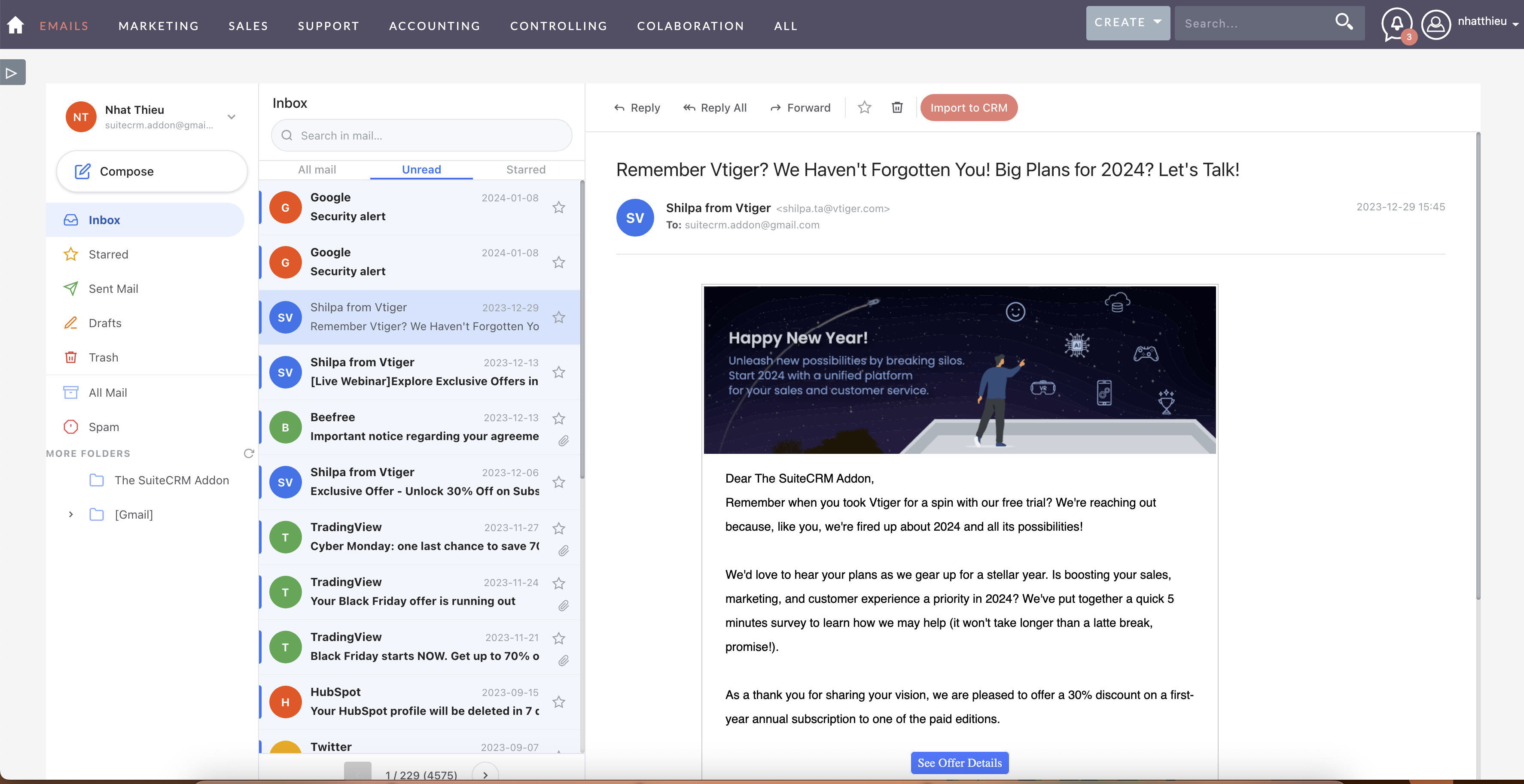
A collapsible folder sidebar, a scannable message list and a full reading pane — no page reloads, no clutter.
- Standard folders — Inbox, Starred, Sent, Sent (CRM), Drafts, Trash, Archive and Spam
- Nested IMAP folder tree with expand / collapse, plus on-demand folder refresh
- Tabs — All Mail, Unread (with live count) and Starred
- Full-text search within the current folder
- Account selector — switch between multiple IMAP inbound accounts
- Pagination across large mailboxes, with live unread badges on the Inbox
- Inline CID image rendering, attachment list with download links, read/unread toggle, read and delivery receipt indicators
Instant inbox — no waiting on IMAP
Most CRM email screens are slow because every action opens an IMAP connection. MTS Mail Pro keeps a local header index, so opening a mailbox, paging, switching tabs and searching are served in milliseconds.
- Background sync scheduler runs every 10 minutes and progressively backfills the index until it mirrors the whole mailbox — even the first open of the day is instant
- Message body cache — reopening a message you have already read is immediate
- Prefetching — the current page is loaded in the background, so opening a message has no per-click wait
- No missing email — deep pages, tab views and searches on a not-yet-indexed mailbox fall back to live IMAP, and pagination always reflects the real mailbox size
- Works without cron — a stale listing triggers a silent background refresh, so new mail still appears
- Message bodies are never stored in the index; they are fetched from the server only when a message is opened
Convert an email into a Case, Opportunity, Task, Bug, Call or Meeting
The fastest way to run email-to-case support and email-to-lead sales inside SuiteCRM. Use the Convert menu on the message toolbar and never leave the inbox.
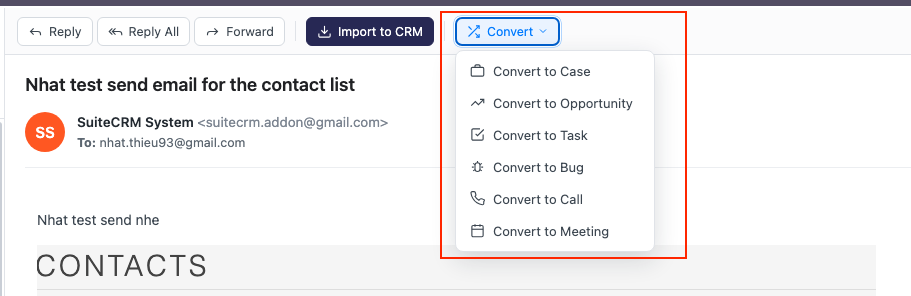
- The form opens pre-filled — the email subject becomes the record name, the body becomes the description
- Fill the essentials inline: Amount and Expected close date for an Opportunity, a Due date for a Task
- The source email is imported and linked to the new record automatically, so it shows up in that record's History
- You land on the new record afterwards to finish the details
The right contacts, attached automatically
The convert form reads the email's From / To / Cc addresses and shows at a glance which are already CRM contacts and which are new. Pick who to relate to the record — existing contacts are linked, new ones are created on the spot — so your Case or Opportunity is connected to the right people from the first minute.
Import and link any email to any record
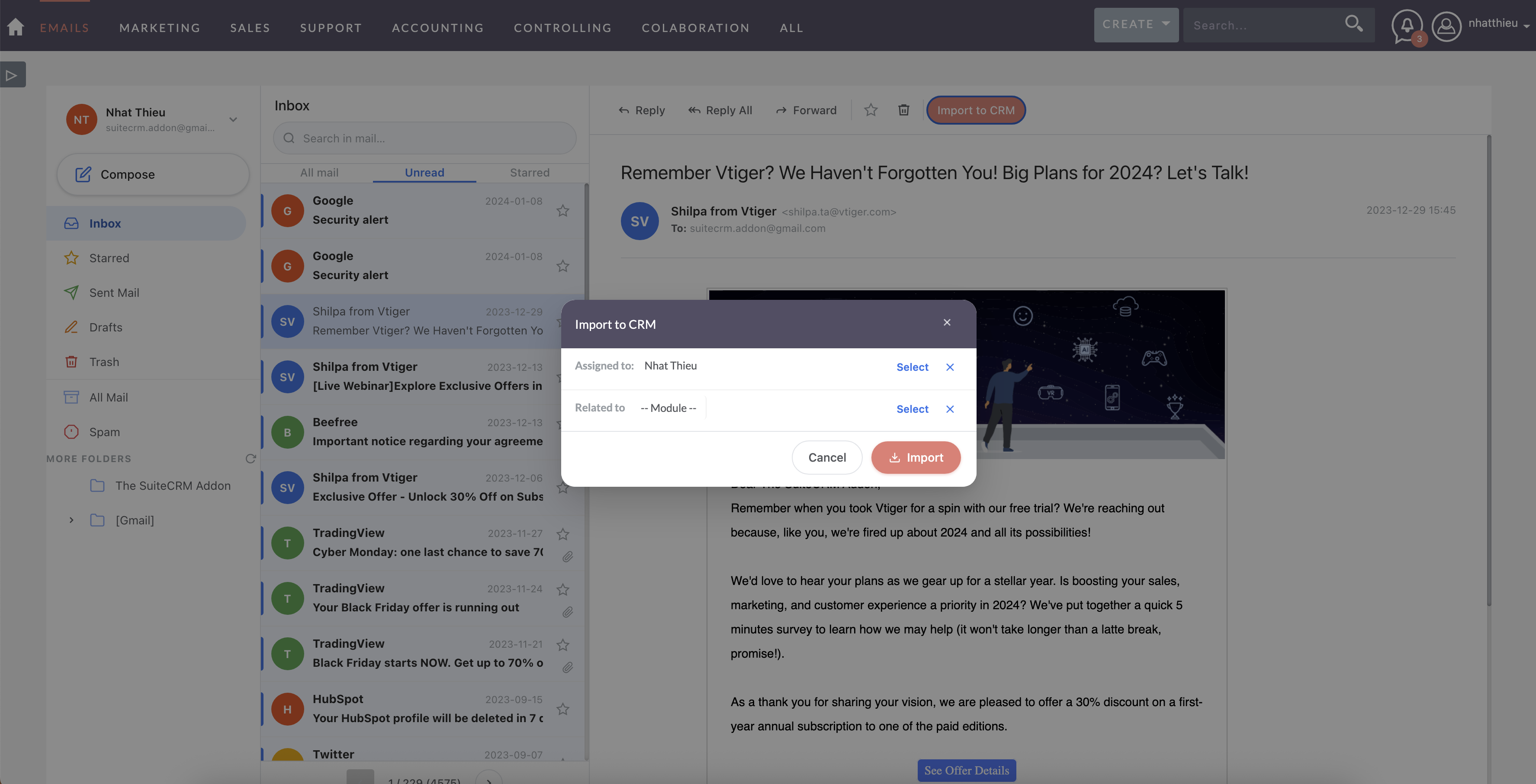
- Import to CRM — save an incoming message as a SuiteCRM Email record in one click
- Link to Record — relate it to any module: Accounts, Contacts, Leads, Opportunities, Cases and more
- Duplicate import prevention — already-imported messages are flagged, so nothing is archived twice
- Quick Create from Email — spin up a Contact, Lead, Case, Bug, Opportunity, Call, Meeting or Task straight from a message
A compose window built for real work
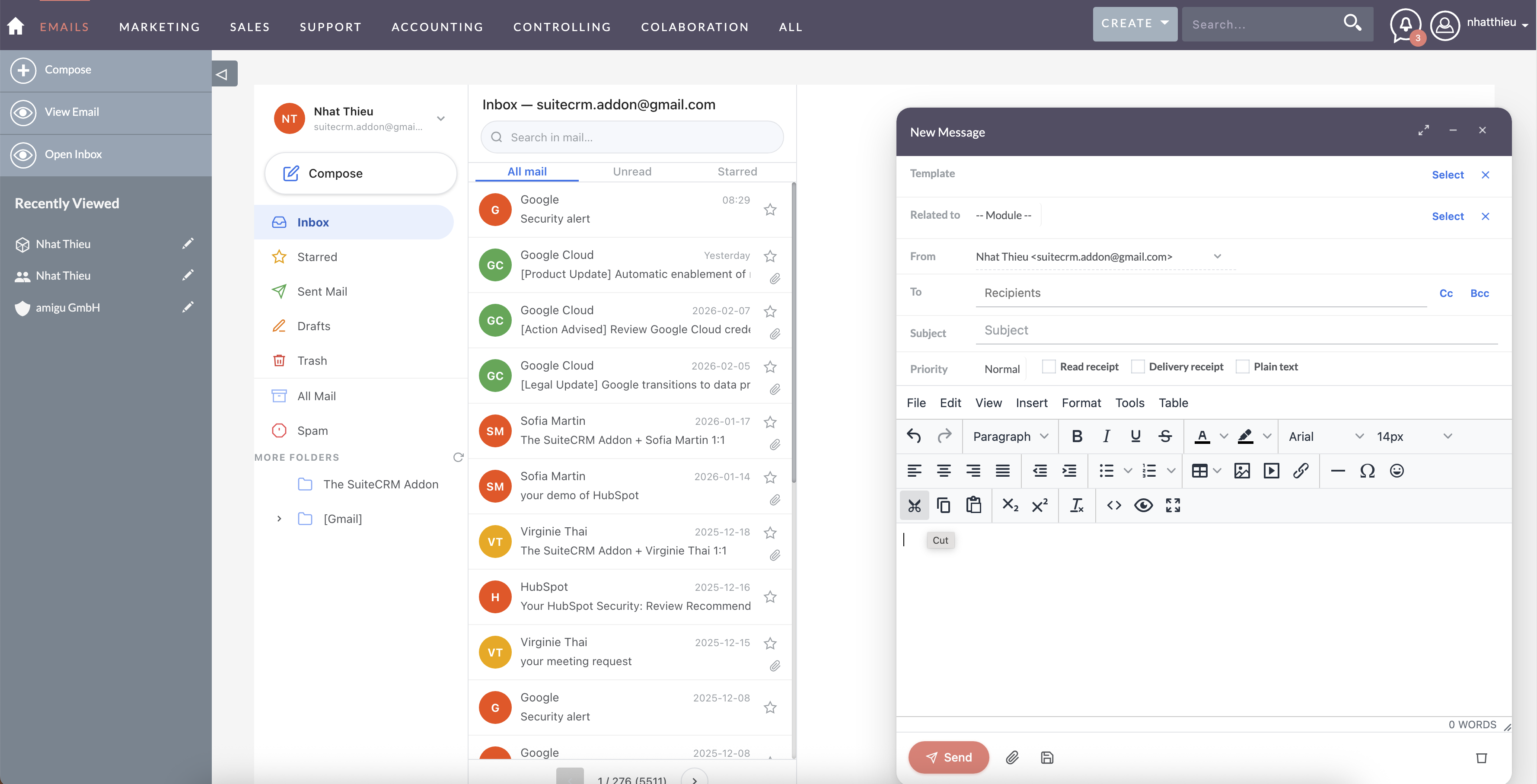
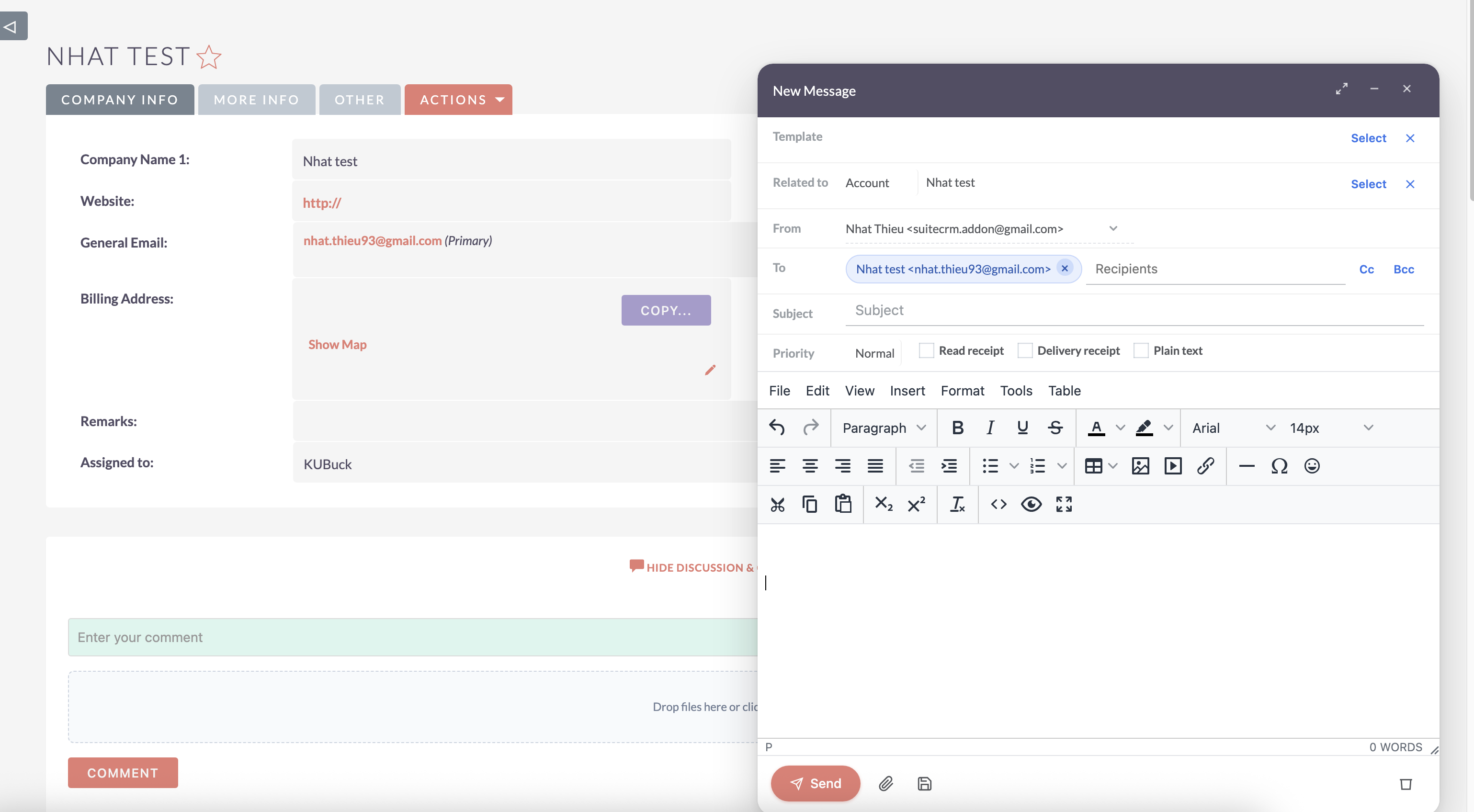
A floating modal you can drag, minimise and expand, powered by TinyMCE 8.
- Recipient chips for To / Cc / Bcc with autocomplete against your CRM contacts
- From account selector that auto-loads the matching signature
- Email template picker — insert your existing SuiteCRM templates
- Related To — link the outgoing email to a CRM record before sending
- Reply, Reply All and Forward with correct
Re:/Fwd:prefixes and quoted bodies - Drafts — save in progress, resume from the Drafts folder, or discard
- Priority, read receipt, delivery receipt, plain-text mode, multiple attachments, inline images
Compose from any record — including SuiteCRM 8
Open the same compose editor from a Contact, Account, Case, Opportunity or Task detail view, with the recipient and relation pre-filled. On SuiteCRM 8 this is opt-in: enable it under Admin → MTS Email Client → Compose Override (SuiteCRM 8) and whitelist exactly which modules it applies to. It is off by default, and the standard SuiteCRM compose window is left completely untouched when disabled.
Works with Gmail, Microsoft 365 and any IMAP server
- OAuth accounts (Gmail, Microsoft 365) use the SuiteCRM platform handler
- Basic-auth accounts use the native IMAP handler for broad server compatibility and correct CRAM-MD5 / DIGEST-MD5, with automatic fallback on PHP builds without the
imapextension - PHP 8.1+ safe — connections that older code misread as failures now work correctly
- Contradictory security flags are normalised, so accounts that previously threw "invalid remote specification" connect without reconfiguration
- Connect and read timeouts mean a slow server fails fast instead of freezing the inbox
- Connection cool-down stops the module retrying a dead account, so hosts never block your IP for repeated failures
- Diagnostic logging at folder load, message list, message read and send, tagged
[MTS_EmailClient]in the SuiteCRM log
Admin controls
- Performance — IMAP connect timeout, IMAP read timeout, email list cache duration
- Index & Sync — background sync scope (personal, or personal plus group mailboxes), index backfill chunk size, index freshness threshold, message body cache, connection cool-down
- Compose override — global toggle plus a per-module whitelist
- Licence management — enter and validate your SuiteCRM Store key, with weekly re-validation and local cache fallback
- Available in English and German
Default SuiteCRM email vs MTS Mail Pro
| Default SuiteCRM Emails | MTS Mail Pro | |
|---|---|---|
| Inbox speed | IMAP call per action | ✅ Local index, milliseconds |
| Background mailbox sync | ❌ | ✅ Every 10 minutes |
| Search | Limited | ✅ Instant, indexed |
| Convert an email to Case / Opportunity / Task / Bug / Call / Meeting | ❌ | ✅ One click, pre-filled |
| Auto-create and relate contacts from From / To / Cc | ❌ | ✅ |
| Compose from a record detail view | ❌ | ✅ Recipient and relation pre-filled |
| Import with module linking | Manual | ✅ One-click dialog, duplicate-safe |
| Rich text editor | Basic | ✅ TinyMCE 8 |
| Inline images | ❌ | ✅ |
| Draft save and resume | ❌ | ✅ |
| Nested IMAP subfolders | Limited | ✅ |
| SuiteCRM 8 support | Legacy view | ✅ Native look and feel |
Requirements
- SuiteCRM 7.x or SuiteCRM 8.x (Community Edition), versions 7.0.0 to 8.10.2
- An IMAP mailbox — Gmail or Microsoft 365 via OAuth, or any IMAP/SMTP server via basic auth
- PHP cURL extension enabled (used for licence validation)
- Run Quick Repair and Rebuild after install so the sync scheduler and index tables are created
Pricing
| Package | Price |
|---|---|
| Yearly | View Price |
| One Time | Contact us |
Backed by a 30-day money-back guarantee.
Works well with
- MTS AI Email Writer — draft and summarise SuiteCRM emails with AI
- MTS Notification — alert users the moment a Case or record is assigned to them
- History Time Line — see every email, call and meeting on one record timeline
- MTS Comment — discuss a customer thread inside the record
- All SuiteCRM add-ons by MienTrungSoft
Support and documentation
- MTS Mail Pro user guide · installation guide · release notes
- Create a support ticket
- SuiteCRM email client guides on our blog
- suitecrm.addon@gmail.com
MTS Mail Pro is developed and maintained by MienTrungSoft, publisher of 40+ SuiteCRM add-ons since 2017.
