

Dynamic view logic for SuiteCRM 8: show or hide fields and panels based on field values, with no coding. Supports SuiteCRM 8.0 to 8.6.
Admin Guide
Configuration
License Configuration
- Login as admin and go to Admin area
- Looking for MTS Dynamic View Settings panel
- Select MTS Dynamic View License Configuration
- Input you license key and hit VALIDATE
MTS Dynamic View Config
- Log in as an admin and navigate to the Admin area.
- Look for the MTS Dynamic View Settings panel.
- Select MTS Dynamic View Config.
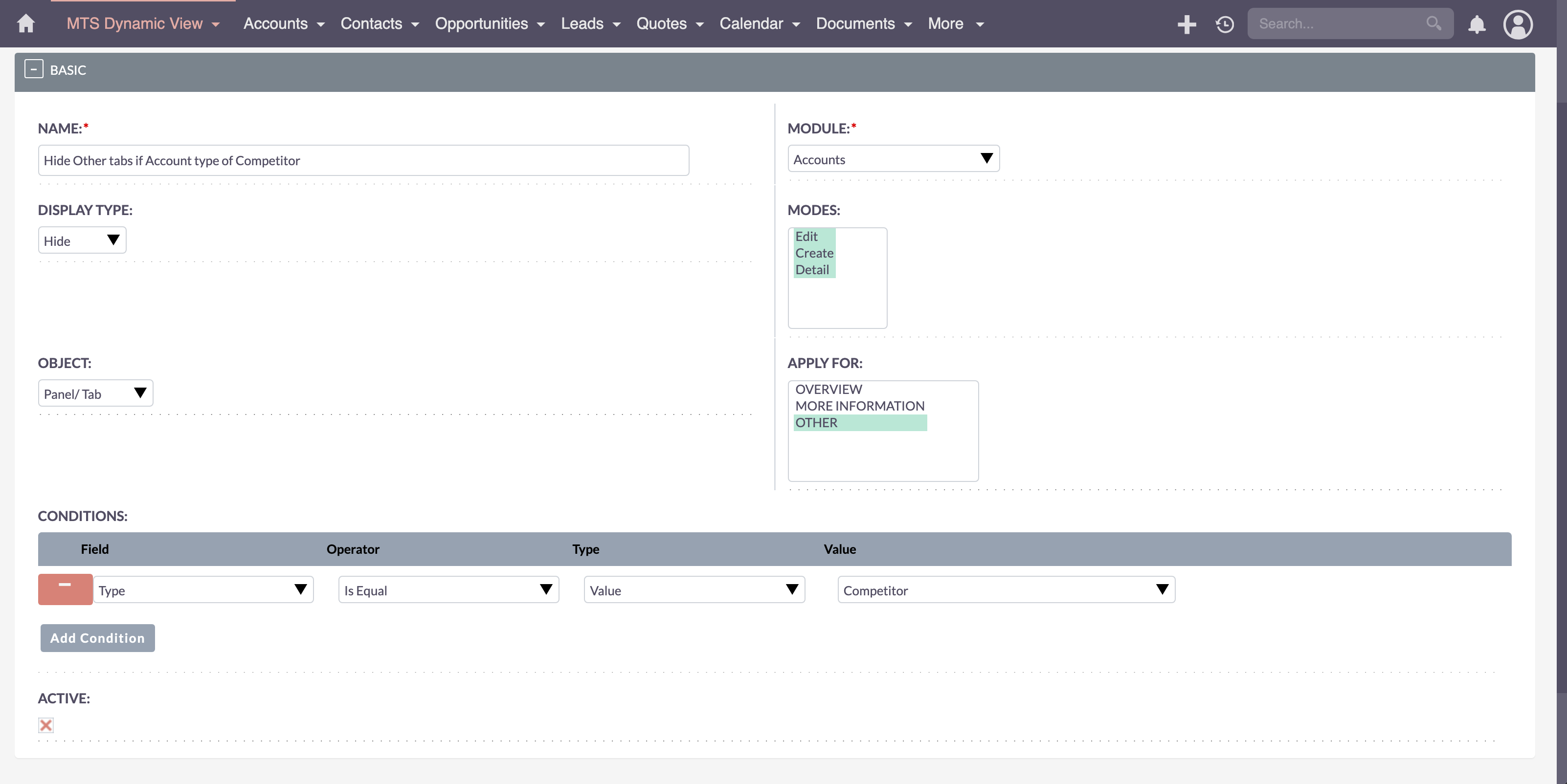
- Click Create MTS Dynamic View Configuration.
- Fill in the Name, select the Module to apply the configuration to, choose the Display Mode, and select whether the object is a Pane/Tab or Field. For Apply For, it will dynamically load options based on the selected object. Click Add Condition to add conditions.
- Ensure the configuration is marked as Active and click Save.
- To disable a configuration, edit the config, uncheck Active, and click Save.
 Saving Comment...